Published 21 September 2026 · ~9 min read · By the Phixo team
Most advice about IRS phishing emails is written for taxpayers: don’t click, the IRS won’t email you, watch for refund bait. All true, and all beside the point if you prepare returns for a living. Attackers worked out long ago that the person filing hundreds of returns is worth more than any of the people on them.
The IRS says so plainly in its guidance for tax professionals: criminals use stolen EFINs and CAF numbers to file fraudulent returns. Phish one taxpayer and you get one refund. Phish one preparer and you get a filing channel the IRS already trusts, plus a filing cabinet of Social Security numbers, dependants, bank details and prior-year returns — everything needed to make the next hundred returns look genuine.
So the question isn’t only “is this IRS email real?” It’s “what is this email actually trying to take from my practice?” Here are the four lures that land on tax offices, the tells for each, and the checks that settle it.
The quick answer
The IRS does not initiate contact by email to request personal or financial information. Real IRS contact starts with a letter in the post. There are narrow exceptions once a case is already open and you’ve agreed to correspond with a named employee — but an unexpected message asking you to verify an account, revalidate credentials, click a link or confirm details is not one of them, no matter how well it’s written or how convincing the sender looks. If you take one thing from this page: never resolve an IRS message from inside the message. Open IRS.gov yourself.
Lure 1: “Your e-Services account requires revalidation”
This is the one built specifically for you, and it is the most dangerous of the four. An email that looks like IRS e-Services correspondence says your account needs revalidation, your EFIN needs confirming, or your access will be suspended unless you act. The link goes to a login page that mirrors the real one. Whatever you type, the attacker now holds.
<no-reply@irs-eservices-portal.com> (the only real one ends in irs.gov)
Subject: Action required — revalidate your EFIN to continue e-filing
Body: “Your e-file application is under review. Confirm your credentials within 24 hours or transmission will be suspended.”
The deadline is the tell. Notice what it’s doing: it isn’t threatening you personally, it’s threatening your ability to file, in season, for clients who are waiting. That’s a far better lever than a refund, and it’s aimed squarely at the busiest, most distracted week of your year.
Two details worth holding on to. First, a domain that contains the word “irs” is not an IRS domain — read the part immediately before the final .gov or .com, because irs-eservices-portal.com and irs.gov.secure-login.net are both attacker-controlled. Second, even a perfect-looking irs.gov sender proves less than you’d hope, since display names and visible from-lines are easy to forge. The address is worth checking because it catches the lazy majority; it is not proof on its own.
Lure 2: the new client who arrives with an attachment
An unsolicited email from a prospective client. Polite, plausible, often a little flattering about a referral. It asks whether you’re taking on new work, and attaches last year’s return or a summary of their situation — or links to it on a file-sharing page that asks you to sign in first.
Subject: Need a preparer for this year — documents attached
Body: “A colleague recommended you. I have attached my prior return so you can quote. Please confirm you can take this on.”
This one works because saying yes is your job. A firm looking for clients is primed to open the attachment, and during filing season an unfamiliar sender is completely normal. The payload is either malware in the document or a credential-harvesting sign-in page behind the “shared file” link.
The defence isn’t to stop reading new enquiries — it’s to change the order of operations. Reply and ask a question before opening anything. A genuine prospect will happily answer, get on a call, or upload documents through your own portal once you point them at it. A phishing run rarely survives a conversation, because the attachment was the entire point.
Lure 3: “Your tax software account is locked”
Same mechanism as the e-Services lure, aimed at the other credential that matters: your professional tax software. An email says your subscription lapsed, your licence needs revalidating before the deadline, or a sign-in was blocked, and a link takes you to a convincing copy of the login screen.
This one is easy to underestimate because it doesn’t mention the IRS at all, and it lands amid genuine renewal traffic from the same vendors. It’s the same pattern we break down for accounting software in our guide to QuickBooks and Intuit phishing emails, and the answer is identical: never sign in through a link in a message about signing in. Open the application the way you always do — your own bookmark, the app itself — and see whether the warning is genuinely waiting for you there. It almost never is.
Lure 4: the IRS notice your clients receive — that lands back on you
Not every attack aimed at your practice arrives in your inbox. Your clients get IRS-impersonation email too: a refund awaiting confirmation, a “discrepancy” needing verification, a demand for immediate payment. And when they get one, they forward it to you, because you’re their tax person.
That’s an opportunity rather than a nuisance. The firms that handle this best get ahead of it with one short note before filing season: the IRS will not email you; if you get one, forward it to us and don’t click; we will never ask you to send bank details by email. It costs one email a year, positions you as the person who protects them, and quietly inoculates your client base against the version of this scam that impersonates you — which is the one that eventually costs somebody a payment.
Worth being explicit with clients on the payment point: the IRS does not demand payment by gift card, wire transfer or cryptocurrency, and does not threaten to have someone arrested over the phone. Those specific demands are conclusive on their own.
How to tell a real IRS message from a fake
Four checks, in the order worth doing them:
- Did it start with email at all? Unsolicited email asking you to act is the giveaway, because genuine contact opens with a posted letter. This single question resolves most cases before you look at anything technical.
- Read the domain right to left. Find the part immediately before the final .gov. Anything else that merely contains “irs” is not the IRS. Do the same for the link target, not the link text.
- Is there a countdown? Suspension in 24 hours, revalidate today, act now to keep filing. Manufactured deadlines exist to stop you checking, and they are the most reliable signal across all four lures.
- Does it want credentials or payment? A legitimate notice never needs your password, and the IRS never asks for payment in gift cards or crypto.
If you want to see the technical trail behind a message — where it actually originated and whether it passed authentication — our free email header analyzer reads the raw headers for you.
The check that settles it, and the one to run weekly
To settle a specific email: don’t click anything in it. Open a new tab, type IRS.gov yourself, sign in to e-Services, and see whether the notice is genuinely waiting for you. If it isn’t reflected in your account, the email is the fake — not your account.
The habit that actually catches a breach, though, is a different one, and the IRS spells it out in its guidance for tax professionals: track your weekly EFIN usage. The IRS posts the number of returns filed under your EFIN each week. Sign in to e-Services, open your e-file application, check EFIN Status, and compare it against what your practice actually filed. If the numbers are off, contact the IRS e-Help Desk. The same page suggests tracking your daily e-file acknowledgements — more acknowledgements than returns you sent is the same alarm from the other direction.
This is the highest-value five minutes in this article. Credential phishing is silent by design; a stolen EFIN produces no bounce, no alert and no obvious symptom. The return count is the one place the theft becomes visible, and it becomes visible while the fraudulent refunds can still be stopped.
Where a tool helps — and where it can’t
Being straight about this matters more than a sales pitch. Automated email checks are genuinely good at the spoofed and lookalike cases, which is most of what lands: a sender on a freshly-registered domain that merely contains “irs”, a reply-to that doesn’t match the visible sender, a link whose real destination is nothing like its text, a message that fails its authentication checks (SPF, DKIM, DMARC). IRS.gov is among the domains Phixo watches specifically for impersonation, alongside the tax and accounting software brands.
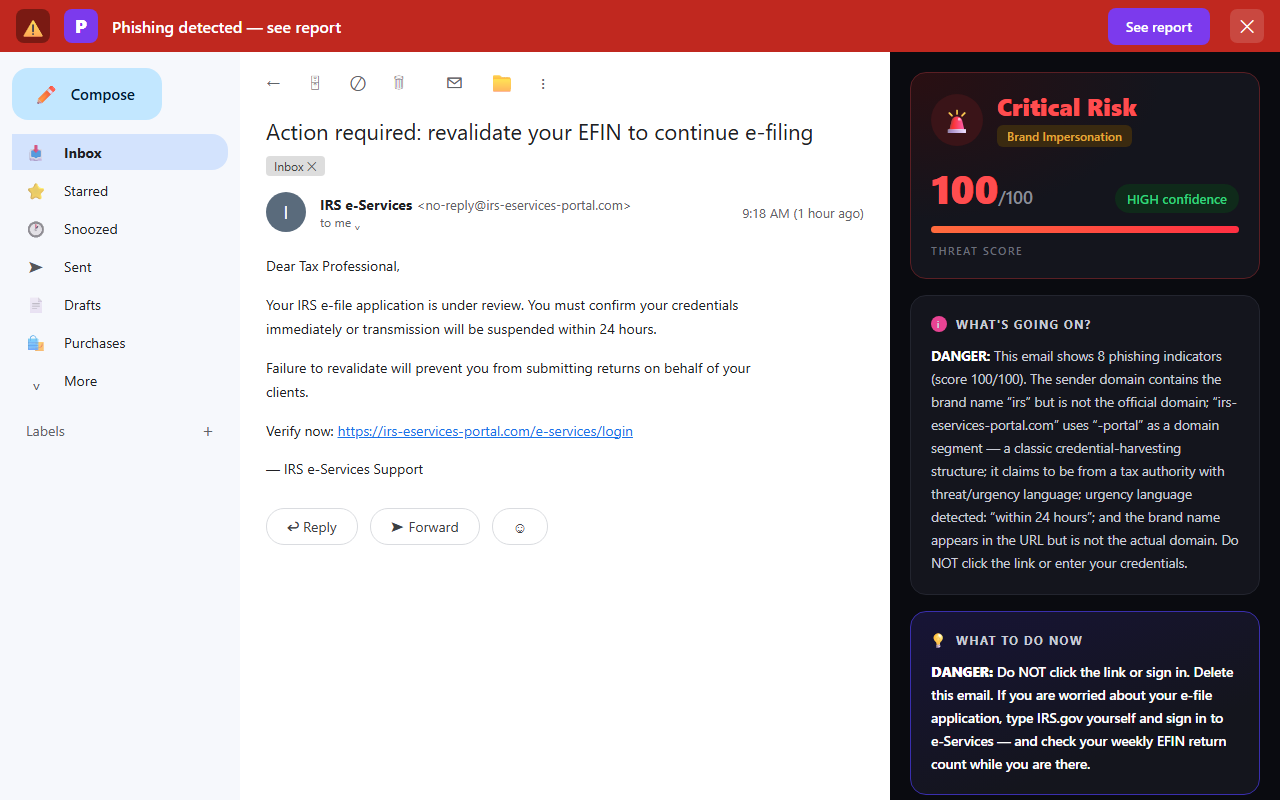
What no tool can promise is catching a message sent from a genuinely compromised mailbox — a real colleague’s or a real client’s account that an attacker is sitting inside. By definition nothing about that message is technically wrong. That isn’t a gap in one product; it’s the reason the verify-out-of-band habit exists. Let a scanner take the spoofing and lookalike cases off your plate automatically, and keep a human rule for anything touching credentials, client data or money. Phixo also can’t see text messages, and IRS-impersonation scams arrive by SMS too — verify those the same way, by opening IRS.gov yourself.
Your legal floor: a written security plan
One thing many small practices don’t realise: paid tax preparers fall under the FTC Safeguards Rule, which requires a written information security plan. The IRS publishes the background in Publication 4557, Safeguarding Taxpayer Data, and an actual template in Publication 5708.
Treat it as a floor rather than a strategy. But for a firm of three people, writing it down is what converts good intentions into a specific answer for who checks EFIN usage, on which day, and what happens when a number looks wrong. That’s the difference between knowing about this attack and being able to catch it.
What to do if you already clicked
Move fast; sequence matters more than perfection.
- Change the password for whatever you signed in to — e-Services, tax software, email — from a different device if you suspect malware, and turn on multi-factor authentication if it wasn’t already on.
- Kill the reuse. If that password protected anything else, change it there too. Credential stuffing is automated and immediate.
- Check your EFIN return count and your e-file acknowledgements straight away, then keep checking weekly. This is where an actual theft shows up.
- Report it. Forward the email to phishing@irs.gov. If client data may have been exposed, contact your IRS Stakeholder Liaison — the IRS states that Liaisons notify IRS Criminal Investigation and others within the agency, which is what allows fraudulent returns filed in your name to be flagged. The IRS reporting page covers the routes.
- Tell your clients if their data was in scope. Unwelcome, but far better coming from you than from a rejected return in February.
If credentials were entered on a fake login page, our step-by-step on what to do after giving a password to a phishing site covers the recovery order in more detail.
Frequently asked questions
Does the IRS ever contact you by email?
Not to start a conversation. The IRS states it does not initiate contact with taxpayers by email, text message or social media to request personal or financial information — real contact begins with a letter in the post. Narrow exceptions exist once a case is open and you’ve agreed to correspond with a named employee, but an unexpected email asking you to verify an account or click a link is not one of them.
Why would a scammer target my tax practice instead of my clients?
Because your practice is a master key. The IRS warns that criminals use stolen EFINs and CAF numbers to file fraudulent returns, and your systems hold complete client records. Phishing one taxpayer yields one refund; phishing one preparer yields a trusted filing channel and the data to make hundreds of returns look legitimate.
How do I check whether someone is filing returns with my EFIN?
The IRS posts your EFIN’s weekly return count. Sign in to e-Services, open your e-file application, check EFIN Status, and compare it with what you actually filed; if the numbers are off, contact the e-Help Desk. Track your daily e-file acknowledgements too — more acknowledgements than returns you sent is the same warning.
Where do I report an email impersonating the IRS?
Forward it to phishing@irs.gov and delete it. If client data may have been exposed, contact your IRS Stakeholder Liaison as well — they notify IRS Criminal Investigation so filings made with your stolen credentials can be flagged. Speed matters, because fraudulent returns are much easier to stop before refunds go out.
Is a tax preparer required to have a data security plan?
Yes. Paid preparers fall under the FTC Safeguards Rule, which requires a written information security plan. IRS Publication 4557 covers safeguarding taxpayer data and Publication 5708 provides a template for writing the plan itself.
Keep reading
- Phishing protection for accounting firms — The four BEC plays that target firms handling client money.
- QuickBooks and Intuit phishing emails — The accounting-software impersonation lures, and how to check.
- The direct deposit change scam — Payroll diversion fraud, and the callback rule that stops it.
- Free email header analyzer — See where a suspicious message really came from.
Catch the lookalike senders before filing season does
Phixo is a browser extension that checks the email open in your Gmail or Outlook across sender and domain reputation, reply-to and link mismatches, lookalike domains, and email authentication (SPF, DKIM, DMARC) — plus an AI read of the language — and explains, in plain English, why it flagged anything. IRS.gov is one of the domains it watches for impersonation. Each person installs it themselves; there’s no IT setup and no admin console. It won’t catch a genuinely compromised mailbox (nothing can), so keep verifying credentials and payments out of band — but it takes the spoofed and lookalike attacks off your plate. Free plan includes 10 scans a day, no credit card. A one-time Google or Microsoft sign-in keeps your scan count tied to your account.
Install Phixo free →Your email body is never stored. Analysis happens in real time and is discarded immediately.