Published 22 August 2026 · ~9 min read · By the Phixo team
If you run or work in a small accounting firm, you already know the uncomfortable truth: you sit on top of exactly what attackers want. You move client money. You hold Social Security numbers, bank details, payroll files and tax returns. And your clients trust you to act on an email instruction without a second phone call. That combination is why accounting firm phishing isn’t generic spam — it’s targeted, patient, and built around how your practice actually works.
The dangerous attacks aren’t the crude “you’ve won a prize” emails your spam filter already eats. They’re business email compromise (BEC): quiet, well-written messages that impersonate a vendor, a client, or a partner in your own firm, and ask you to move money or hand over data. The FBI’s Internet Crime Complaint Center (IC3) consistently ranks BEC among the costliest cybercrimes it tracks, with billions in reported losses year after year — and finance and accounting functions are squarely in the blast radius.
Here are the four plays that land on accounting firms most often, the red flags for each, and the single rule that beats almost all of them.
Play 1: the vendor invoice with “new” bank details
A supplier you genuinely use — your software vendor, a subcontractor, a landlord — sends an invoice that looks exactly like their usual one. Buried in it: “Please note our banking details have changed; kindly use the account below for this and all future payments.” Pay it, and your money lands in the attacker’s account instead.
<billing@acme-software.com> (real domain: acmesoftware.com)
Subject: Updated remittance details — invoice #4471
Body: “Our bank has changed. New account details attached.”
This is the same mechanism we break down in our full guide to spotting a fake invoice email. Two shapes exist: a lookalike domain a character or two off the real one, and the harder case — a genuinely compromised supplier mailbox, where the email really does come from the correct address. For accounting firms the stakes are higher than for most businesses, because you may be authorising these payments on a client’s behalf.
Play 2: the client who wants their payout redirected
This one is specific to firms that handle client funds — disbursements, refunds, trust accounts, payroll runs. An attacker impersonates one of your clients and emails to “update” where their money should go.
<jane.okafor.finance@gmail.com> (not her usual work address)
Subject: Change to my payout account
Body: “Hi — we’ve switched banks. Please send this quarter’s distribution to the new account below. I’m travelling so email is easiest.”
The tells are the mismatched sender address (a free webmail account, or a lookalike of the client’s domain), the change of bank details, and the convenient excuse for why they can’t talk right now. “I’m travelling / in meetings / can’t take calls” is not a coincidence — it exists to stop you from verifying by voice.
Play 3: partner and “managing partner” fraud
Also called CEO fraud, this targets the internal chain of command. A junior bookkeeper or office manager gets an email that appears to come from a partner or the firm owner, asking for an urgent transfer or a gift-card purchase, framed as confidential and time-sensitive.
<d.reyes.partner@outlook.com>
Subject: Quick favour — are you at your desk?
Body: “I’m tied up with a client and need a wire sent today before 3pm. Keep this between us for now — I’ll explain later. Can you handle it?”
Every element is engineered: the seniority discourages you from pushing back, the deadline removes time to think, and the secrecy stops you from checking with a colleague. Real partners rarely operate this way — and a firm that has agreed in advance that no wire happens on email-only instruction removes the pressure entirely.
Play 4: the tax-season W-2 and data request
Around tax season a specific BEC variant spikes. An attacker poses as a partner, a client company, or an executive and asks payroll or accounting staff for W-2 forms, a list of employee tax data, or client records. Hand it over and you’ve exposed Social Security numbers and wage data that feed refund fraud and identity theft. The IRS has issued repeated public warnings about the W-2 phishing scam, precisely because it targets the people who process this data every day.
Tax season raises your risk, not just your workload. Attackers know accounting and payroll teams are buried in deadlines from January through April, moving fast on data requests that would get more scrutiny in a quiet month. Treat any bulk request for tax data, W-2s or client PII — even from a familiar name — as something to confirm out-of-band before you send a single file.
The one rule that beats most of these
Across all four plays, the same control does the heavy lifting: verify out-of-band, every time, for anything touching money or sensitive data. “Out-of-band” means using a channel other than the email that made the request. Call the vendor, client, or partner on a number you already have on file — from a signed engagement letter, a prior invoice, or their website that you navigated to yourself — never a number printed in the suspicious email, because that just connects you to the scammer.
For a small firm, this becomes three written rules everyone follows:
- No bank-detail change is actioned without a callback to a known number, confirmed with a person.
- No wire or payout above a set threshold goes out on a single approval — require a second person, especially for anything “urgent” or “confidential.”
- No bulk tax data or W-2 file leaves the firm on email request alone — confirm the request by phone first.
It feels like friction. It is the single most effective defence against BEC, and it costs a two-minute phone call against a loss that can run into six figures and a breach of client trust you can’t easily buy back.
The 60-second BEC check, before any payment or data request
- Does the sender’s real address exactly match the vendor, client or partner — not a lookalike or a free webmail account?
- Is it asking to change bank details, redirect a payout, or send an urgent wire?
- Has the reply-to address been quietly swapped for a different one?
- Is there a reason baked in for why they can’t get on a phone right now?
- Is it a bulk request for W-2s, PII or client tax data — especially in tax season?
- Have I verified by phone on a number I already have — not one from the email?
Where a tool helps — and where it can’t
Let’s be straight about the limits, because honesty matters more than a sales pitch here. Automated email checks are genuinely good at catching the spoofed and lookalike cases: a scan can flag that a message claiming to be from your software vendor actually came from a freshly-registered lookalike domain, that the “managing partner” email is from an outlook.com address rather than your firm’s domain, that the reply-to doesn’t match the sender, or that the message failed its email authentication checks (SPF, DKIM, DMARC). Those are exactly the signals that separate an impersonator from the real person.
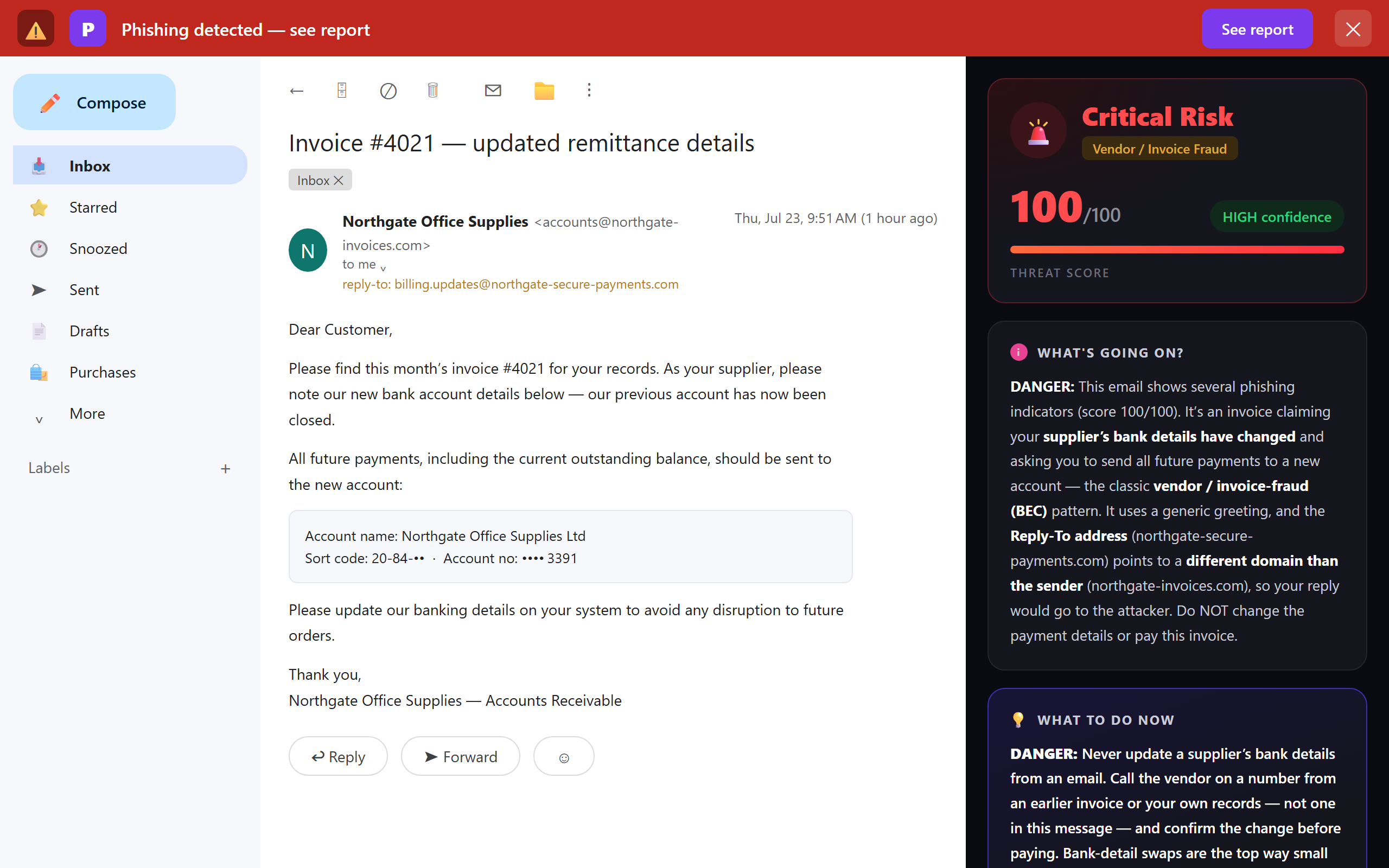
What no tool can promise is catching a genuinely compromised mailbox — when an attacker is inside your vendor’s or client’s real email account, sending from the correct address. By definition, nothing about that message is technically wrong. That’s not a gap in one product; it’s the reason the callback rule exists. Use a scanner to knock out the spoofing, lookalike and authentication-failure cases automatically, and keep the phone-call rule for anything touching payment details or client data. Together they cover both shapes. If you want to see where a suspicious message truly originated, our free email header analyzer reads the raw headers for you.
Protecting a firm with no IT department
Here’s the part most security advice gets wrong for a small practice: it assumes you have an IT team, an admin console, and a budget for a mail-server gateway. You don’t, and you don’t need one. For a firm of a handful of people, the realistic, effective stack is:
- The written verification rules above — agreed once, followed by everyone. This is free and it’s your strongest control.
- Multi-factor authentication on every mailbox and on your tax and accounting software, so a stolen password alone can’t open the door.
- A per-person check in the inbox that flags spoofed and lookalike senders as each email is opened — so the person reading a “changed bank details” message gets a warning at the exact moment it matters, without waiting for anyone else.
That last layer is where a browser extension like Phixo fits. It’s deliberately a personal tool, not an enterprise gateway — and for a small firm that’s the strength, not a limitation. Each person installs it themselves in a couple of minutes, and each person is protected in their own Gmail or Outlook. There’s no server to configure, no IT project, and no seat minimum to negotiate. If you want the wider market context, our honest comparison of anti-phishing browser extensions lays out the options side by side.
What to do if your firm has already been hit
Move fast, in this order. Contact your bank immediately — if a fraudulent transfer is recent, they may be able to recall or freeze it, and the first few hours matter enormously. Report it to the FBI’s IC3 (or your country’s equivalent fraud authority). Tell any affected client and the real vendor, because if a mailbox was compromised, other people are being targeted through the same account. If a W-2 or tax-data request was fulfilled, notify affected staff or clients so they can watch for tax-refund fraud, and follow the IRS guidance for data-loss reporting. And if anyone clicked a link or entered credentials along the way, work through our step-by-step guide on what to do if you clicked a phishing link and reset the exposed passwords.
Business email compromise is really just phishing pointed at the part of your firm that moves money and data. The instincts that protect you here carry over — see the general warning signs of a phishing email, and why a routine DocuSign “sign this” request is a favourite disguise for firms that handle contracts all day.
Frequently asked questions
Why are accounting firms targeted by phishing and BEC?
Because you sit exactly where the money and the data are. Accounting firms move client funds, hold tax and payroll records, and are trusted to act on email instructions — so one convincing message can redirect a payment or expose a client’s PII. Small firms are especially attractive because they rarely have a dedicated security team, so the defence often rests on whoever opens the email.
What is business email compromise (BEC)?
It’s a scam where an attacker impersonates someone you trust — a vendor, a client, or a partner in your firm — to trick you into sending money or sensitive data. It usually relies on plain text rather than malware: a spoofed or lookalike sender, a request to change bank details, or an urgent wire instruction. The FBI’s IC3 consistently ranks it among the costliest cybercrimes it tracks.
How can a small accounting firm protect itself from wire and invoice fraud?
Adopt one firm-wide rule: any change to bank details, and any unexpected wire or payout, is verified by phone on a number you already have — never one from the email. Add dual approval for payments over a threshold, MFA on every mailbox, and a per-person inbox check that flags spoofed and lookalike senders. Process handles the compromised-mailbox case; technology handles the spoofing.
What is the W-2 phishing scam?
A BEC attack that spikes at tax season: an attacker poses as a partner, client or executive and asks payroll or accounting staff for W-2 forms or employee tax data. Handing it over exposes Social Security numbers and wages used for refund fraud and identity theft. The IRS has issued repeated warnings about this exact scam.
Does an accounting firm need IT staff to use anti-phishing software?
No. Phixo is a browser extension each person installs themselves in Chrome or Edge and uses inside Gmail or Outlook on the web — no server, no admin console, no IT project. It’s a privacy-first personal tool rather than an enterprise gateway, which is exactly why it suits small firms without a security team.
Keep reading
- How to spot a fake invoice email — The two shapes of invoice fraud, and the checks that catch each.
- The 8 warning signs of a phishing email — The checks that expose almost every fake.
- Free email header analyzer — See where a suspicious message really came from.
- The best anti-phishing browser extensions — The tools that catch these emails, compared side by side.
Catch the spoofed senders before your firm pays them
Phixo is a browser extension that checks the email open in your Gmail or Outlook across sender and domain reputation, reply-to and link mismatches, lookalike domains, and email authentication (SPF, DKIM, DMARC) — plus an AI read of the language — and explains, in plain English, why it flagged anything. Each person on the team installs it themselves; there’s no IT setup and no admin console. It won’t catch a genuinely compromised mailbox (nothing can), so keep the callback rule for bank-detail changes — but it takes the spoofed and lookalike attacks off your plate. Free plan includes 10 scans a day, no credit card. A one-time Google or Microsoft sign-in keeps your scan count tied to your account.
Install Phixo free →Your email body is never stored. Analysis happens in real time and is discarded immediately.