Published 27 July 2026 · ~7 min read · By the Phixo team
E-signature emails occupy a strange place in your inbox: they’re unexpected by design (someone else decides when to send you a contract), they demand a click by design (that’s how signing works), and they often carry real money or legal weight. Scammers noticed. A fake DocuSign notification borrows all of that built-in legitimacy and points the “Review document” button at a credential-harvesting page instead.
The payload is usually one of two things: a fake sign-in page that asks for your email password “to view the document” — which hands over your whole inbox, not just one contract — or a malicious attachment dressed up as the document itself. Either way, the tells are consistent, and DocuSign ships a built-in safety net most people have never noticed.
The quick answer
Check the sender’s domain: real DocuSign envelope emails come from docusign.net addresses (like dse@docusign.net), with some account emails from docusign.com. Then use the safety net: every real DocuSign email includes a security code, usually at the bottom. Ignore the email’s links entirely, go to docusign.com → Access Documents, and enter the code — the genuine document opens with zero risk. No security code, or a code that doesn’t work? The email is fake. And remember: signing a document never requires your email password — any page demanding it is a trap.
What a real DocuSign email looks like
- It comes from docusign.net. The display name shows who sent the document (“Alex Morgan via DocuSign”), but the address behind it is on docusign.net — not a domain that merely contains the word.
- It names a real sender and a real document — the person’s name and email, and a document title you can sanity-check. A contract from someone you’ve never heard of is its own red flag, real platform or not.
- It carries a security code. Scroll to the bottom of a genuine notification and you’ll find an alternate signing method: go to docusign.com, choose Access Documents, enter the code. Fakes usually omit this — a working code is something they can’t give you.
- It never asks for your email password. Recipients can view and sign without a DocuSign account, and DocuSign has no use for your Gmail or Outlook login. “Sign in with your email to view the document” is the scam, verbatim.
5 tells of the fake
1. The sender domain isn’t docusign.net
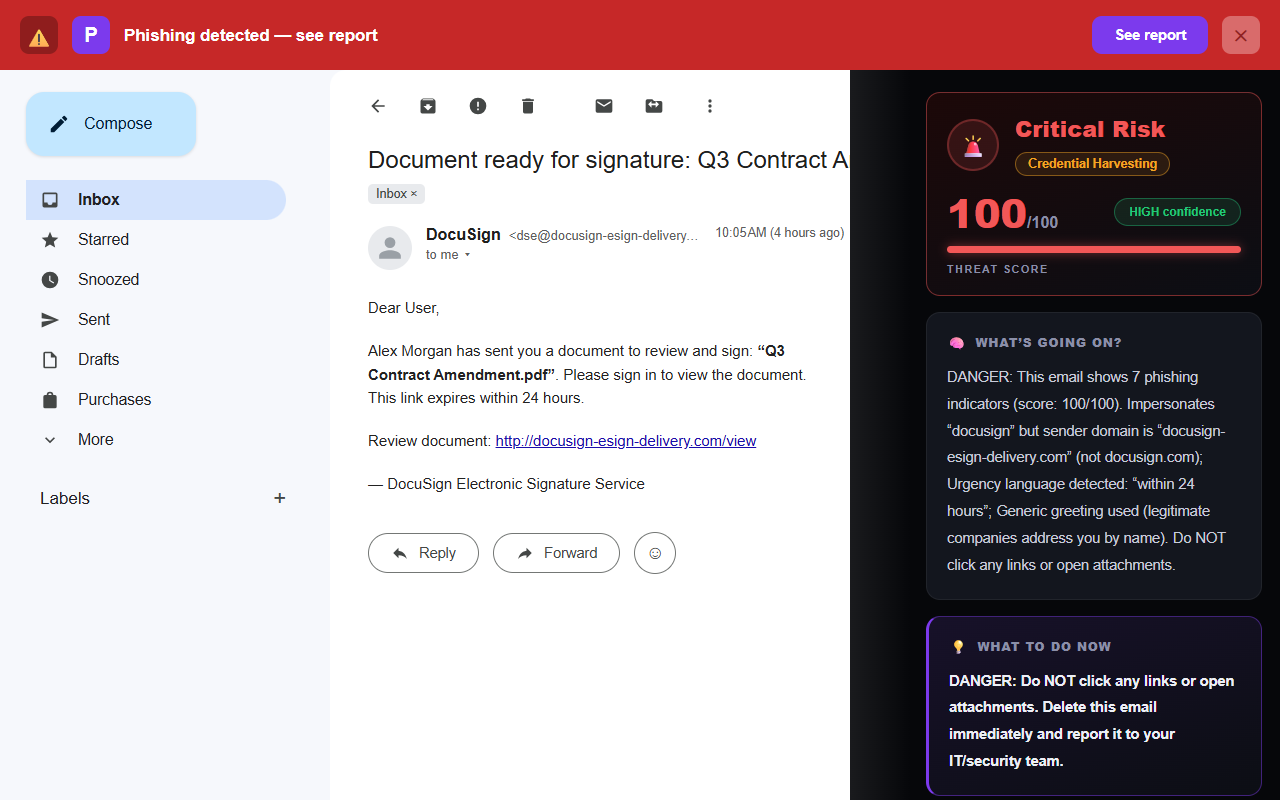
<dse@docusign-esign-delivery.com>
Clever, isn’t it — the fake even copies the real dse@ prefix. But the registered domain is docusign-esign-delivery.com, not docusign.net. Read domains from the right: the part before the last dot-something is the domain that counts, and everything else is decoration.
2. “Sign in to view the document”
The linked page shows a document icon behind a login form — often offering “Sign in with Google” or “Sign in with Office 365” buttons that lead to pixel-perfect fake login pages. Signing someone’s contract does not require your email credentials. The document is the bait; your inbox is the target — because whoever controls your email can reset the password on nearly everything else you use.
3. A countdown
“This link expires within 24 hours” reads as normal document hygiene, which is why it works — but real DocuSign envelopes typically stay open for weeks, and the sender decides the deadline, not the notification. In a fake, the clock exists for one reason: to get you clicking before you check anything on this list.
4. A generic greeting and a vague sender
“Dear User” on a document you supposedly need to sign personally is a contradiction. Real envelope emails address you by name and tell you exactly who sent the document and what it’s called. Vague sender + generic greeting + generic “Contract.pdf” = blast to a list.
5. The attachment variant
Some fakes skip the link and attach “the document” directly — usually an HTML file that opens a local fake login page, or an office file that asks you to enable macros. A real DocuSign notification points you to the document on DocuSign’s site; treat an unexpected attachment claiming to be the document as hostile. This overlaps with the tricks in our guide to fake invoice emails — same family, different costume.
The 30-second DocuSign email check
- Is the sender on docusign.net (or docusign.com)?
- Do I know the person named as the document’s sender — and am I expecting a document from them?
- Is there a security code I can use at docusign.com → Access Documents instead of clicking?
- Is anything asking for my email password?
- Is “the document” actually an attachment — especially an .html file?
The safest way to open any e-signature document
- Don’t click the button. Find the security code at the bottom of the email instead.
- Type docusign.com yourself, choose Access Documents, and enter the code. The real document — if it exists — opens right there.
- Still unsure? Ask the sender. If the email says Alex sent you a contract, message Alex on a channel you already use. Twenty seconds, and it also catches the scariest variant: a real-looking envelope sent from a colleague’s compromised account.
That verify-at-the-source habit is the same one that defeats the fake Google security alert and the fake Netflix payment email — take the email out of the equation and check with the service directly. If you want to see an email’s technical trail first, our free email header analyzer shows where it really came from and whether it passed authentication.
What if you already entered your password?
If you typed your email password on a fake “view document” page, treat your email account as compromised — that’s bigger than one document:
- Change your email password now (Gmail, Outlook — whichever you entered), from the provider’s real site typed by hand.
- Turn on two-factor authentication if it isn’t on.
- Check your mailbox rules for forwarding rules you didn’t create — attackers add them to keep reading your mail after a password change.
- Sign out all other sessions from your account’s security page, and review recent sign-in activity.
- Change the password anywhere you reused it, then work through our full step-by-step recovery guide.
Frequently asked questions
What address do real DocuSign emails come from?
Envelope notifications come from docusign.net addresses (for example dse@docusign.net), with some account emails from docusign.com. The display name shows who sent the document; the domain after the @ is what to verify.
How can I open a document without clicking the email link?
Use the security code near the bottom of every genuine notification: go to docusign.com, choose Access Documents, enter the code. No code, or a code that doesn’t work there, means the email is fake.
Do I need to log in with my email password to sign?
No. Recipients don’t need a DocuSign account, and no legitimate e-signature flow asks for your Gmail or Outlook password. Pages that do are harvesting your inbox login.
How do I report a fake DocuSign email?
Forward it to spam@docusign.com, hit “Report phishing” in Gmail or Outlook, then delete it. Already entered credentials? Change that password immediately and enable two-factor authentication.
Keep reading
- How to spot a fake invoice email — the document scam’s money-shaped sibling.
- The 8 warning signs of a phishing email — the full checklist behind every guide on this blog.
- What to do if you clicked a phishing link — already clicked? Damage control, step by step.
- The best anti-phishing browser extensions — The tools that catch emails like this one, compared side by side.
Not sure about an email? Let Phixo check it
Phixo is a browser extension that checks the email open in your Gmail or Outlook against several of the signals above — brand impersonation on lookalike domains, link mismatches, sender and domain reputation, and email authentication (SPF, DKIM, DMARC) — plus an AI read of the language, and flags anything suspicious in seconds. Free plan includes 10 scans a day, no credit card. A one-time Google or Microsoft sign-in keeps your scan count tied to your account.
Install Phixo free →Your email body is never stored. Analysis happens in real time and is discarded immediately.