Published 29 June 2026 · ~6 min read · By the Phixo team
Phishing is still the single most common way people get hacked — not because the attacks are technically clever, but because they catch you in a hurry. A fake invoice. A “your account will be suspended” warning. A delivery notice for a package you don’t remember ordering. The goal is always the same: get you to click a link, hand over a password, or pay an invoice before you stop to think.
The good news is that phishing emails almost always give themselves away. Once you know what to look for, you can spot most of them in a few seconds. Here are the eight signs that matter most.
1. The sender’s real address doesn’t match the name
The display name is the easiest thing in the world to fake. Anyone can send an email that says it’s from “PayPal Support” or your CEO. What they can’t easily fake is the actual address behind it. Click or tap the sender name to reveal the full email address and look at the part after the @.
<paypal-secure-billing@mail-account-verify.com>
The real PayPal sends from @paypal.com, not @mail-account-verify.com. When the domain is some unrelated or oddly-specific string, that’s a strong red flag. PayPal impersonation is so common we’ve written a dedicated guide: how to tell if a PayPal email is real. The same sender-domain check unmasks the fake Google “security alert” email — real ones come only from accounts.google.com.
2. It creates urgency, fear, or pressure
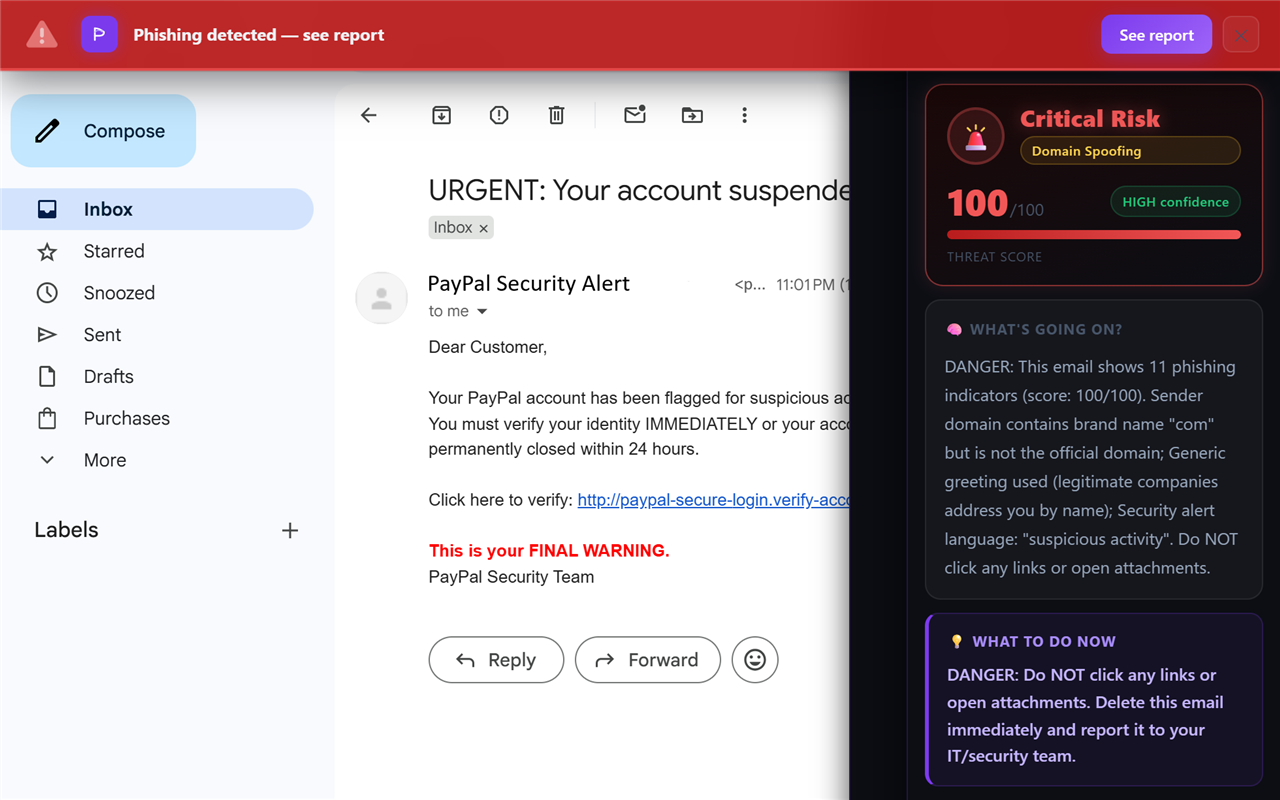
Phishing relies on emotion overriding judgement. “Your account will be closed in 24 hours.” “Suspicious login detected — verify now.” “Final notice before legal action.” Real companies rarely threaten you with an immediate deadline over email. If a message is trying to make you panic and act right now, slow down — that pressure is the attack.
3. Links don’t go where they claim
Before clicking any link, hover your mouse over it (on desktop) or press and hold it (on mobile) to preview the real destination. The visible text might say www.microsoft.com while the actual link points somewhere else entirely.
Actual destination: http://ms-account-login.ru/verify
If the destination doesn’t match the brand — or uses a strange country code, a shortened URL, or an IP address — don’t click.
4. It uses a generic greeting
“Dear Customer.” “Dear User.” “Dear account holder.” A company you actually have an account with usually knows your name. Mass phishing campaigns are sent to thousands of addresses at once, so they fall back on generic greetings. It’s not proof on its own, but combined with other signs it adds up.
5. It asks for passwords, payment, or personal details
This is the heart of almost every phishing attack. Legitimate organisations will never email you asking for your password, full card number, one-time code, or to “confirm” your login on a page reached through an email link. Any message asking you to enter credentials should be treated as hostile until proven otherwise. When in doubt, go to the website directly by typing the address yourself — never through the email’s link.
6. The domain is a lookalike of a real one
Attackers register domains that look almost identical to trusted brands. This is called typosquatting, and the best versions use homoglyphs — characters that look the same but aren’t.
google-support.com (extra word bolted on)
micros0ft.com (a zero, not an “o”)
These are deliberately hard to catch at a glance, especially on a phone. When a domain almost looks right, look again, character by character.
7. There’s an unexpected attachment
An invoice, a “receipt,” a shipping label, a resume — attachments are a classic way to deliver malware. Be especially wary of .zip, .html, .iso, and Office files that ask you to “enable content” or “enable macros.” If you weren’t expecting a file, don’t open it — confirm with the sender through another channel first.
8. The email fails authentication checks
This one is more technical, but it’s powerful. Modern email uses three standards — SPF, DKIM, and DMARC — to prove a message really came from the domain it claims. When a phishing email spoofs a sender, these checks often fail. Most people never see this, because it’s buried in the raw email headers. This is exactly the kind of check that’s worth automating.
The 10-second phishing checklist
- Does the real sender address match the brand?
- Is it pressuring me to act immediately?
- Where do the links actually point?
- Is it asking for a password, code, or payment?
- Is the domain a near-perfect lookalike?
- Was I expecting this attachment?
What to do if you spot a phishing email
Don’t click, don’t reply, don’t open attachments, and don’t enter any information. Report it to your email provider as phishing (Gmail and Outlook both have a one-click “Report phishing” option), then delete it. If you’ve already clicked a link and entered a password, change that password immediately on the real site and turn on two-factor authentication — then follow our full step-by-step guide on what to do if you clicked a phishing link.
The hardest part isn’t knowing the signs — it’s remembering to check them every time, on every email, when you’re busy. That’s where most people get caught.
Frequently asked questions
How can you tell if an email is phishing?
Check the sender’s real email address, hover over links to see their true destination, and be suspicious of urgency, generic greetings, and any request for passwords, codes, or payment. A single strong sign is reason enough to stop and verify.
Is it dangerous just to open a phishing email?
On modern email clients, simply opening a message is usually low risk. The real danger is in acting on it — clicking links, downloading attachments, or entering information. Avoid those until you’ve verified the sender.
What if I already clicked the link?
If you only clicked but entered nothing, close the page and run a malware scan. If you entered a password, change it immediately on the real site and enable two-factor authentication. If you entered card details, contact your bank.
Keep reading
- Can you spot the phish? — Test your eye on 8 real-vs-fake emails — no sign-up, nothing recorded.
- What to do if you clicked a phishing link — The calm, step-by-step damage-control checklist.
- Is that Google "security alert" real? — The most-copied security email on the internet, dissected.
- The best anti-phishing browser extensions — The tools that catch emails like this one, compared side by side.
Let Phixo run these checks for you
Phixo is a browser extension that checks each email you open in Gmail or Outlook against several of the signals above — sender and domain reputation, link mismatches, lookalike domains, and email authentication (SPF, DKIM, DMARC) — plus an AI read of the language, and flags anything suspicious. Free plan includes 10 scans a day, no credit card. A one-time Google or Microsoft sign-in keeps your scan count tied to your account.
Install Phixo free →Your email body is never stored. Analysis happens in real time and is discarded immediately.