Published 6 July 2026 · ~8 min read · By the Phixo team
Freelancers and small teams handle invoices constantly — sending them, receiving them, paying them. That routine is the whole point of an invoice scam email: a fake bill looks like just another item in a busy day, and busy is when people click and pay without thinking.
But “fake invoice email” actually covers two very different attacks, and they need different defenses. Get the distinction and you’ll catch nearly all of them.
Two scams wearing the same disguise
Shape 1 — the fake invoice from a stranger. A bill you weren’t expecting, from a company you don’t recognise, hoping you’ll either open the attachment (malware) or pay in a panic. These are noisy and relatively easy to catch.
Shape 2 — the payment-redirect scam. This is the quiet, costly one. An attacker impersonates a supplier you genuinely work with and asks you to update their bank details, so your next real payment lands in the scammer’s account. There’s often no malware and no dodgy link — just a convincing message. This is the shape that drains five- and six-figure sums from small businesses.
Shape 1: the fake invoice from a stranger
These arrive out of nowhere — an “overdue” invoice, a “renewal” for software you don’t use, a subscription you never signed up for. The goal is either to get you to open a booby-trapped attachment or to pay a bill that was never real.
<invoices@secure-billing-portal.com>
Subject: Overdue Invoice #INV-99432 — Immediate Payment Required
Attachment: Invoice_99432.zip
The tells: a company you have no relationship with, an unfamiliar sender domain, pressure to pay “immediately,” and an attachment you weren’t expecting. Be especially wary of .zip, .html, .iso and Office files that ask you to “enable content” or “enable macros” — those are classic malware delivery methods. If you don’t recognise the supplier and never ordered anything, don’t open the file and don’t pay. Many of these also carry the general warning signs of a phishing email: generic greetings, mismatched links, and urgency.
Shape 2: the payment-redirect scam (the expensive one)
This is where the real money is lost, and where careful people still get caught — because everything looks right. It usually plays out one of two ways:
- A lookalike domain. The email comes from a domain a character or two off the real one — acmesupplies.com becomes acme-supplies.com or acmesupplíes.com — and mimics a supplier’s real invoice format.
- A genuinely compromised mailbox. The attacker has actually broken into the supplier’s real email account and is sending from the correct address, sometimes even replying within a real email thread.
Either way, the message is calm and businesslike. There’s a real-looking invoice, and somewhere in it: “Please note our bank details have changed — kindly use the account below for this and future payments.”
This is the honest part most vendors won’t tell you: when the supplier’s own mailbox is compromised, the email passes every technical check. The sender address is real. The authentication passes. The writing style matches. No security tool can reliably tell you that a legitimate account has been hijacked. That’s why the only dependable defense here isn’t a scan — it’s a phone call.
The one rule that beats the redirect scam
Any change to bank or payment details gets verified out-of-band — every time, no exceptions. “Out-of-band” simply means using a channel other than the email that made the request. Call the supplier on a phone number you already have on file (from a previous contract, their website you navigated to yourself, or an earlier invoice) — never a number printed in the suspicious email, because that just connects you to the scammer. Speak to a person, confirm the change is real, and only then update anything.
It feels like friction. It is the single most effective control against payment-redirect fraud, and it costs you two minutes against a potentially catastrophic loss.
The fake-invoice checklist
- Do the invoice number, amount, and work actually match your own records?
- Does the sender’s domain exactly match the supplier — not a lookalike a character or two off?
- Is the reply-to address the same as the sender, or has it been quietly swapped?
- Was I expecting this attachment — and is it a safe file type?
- Do the payment links go where they claim when I hover over them?
- Is it asking me to change bank details? If so — stop and verify by phone.
Where a tool helps — and where it can’t
Let’s be straight about the limits. Automated checks are genuinely good at catching lookalike-domain redirect attempts and stranger invoices: a scan can flag that a message claiming to be from a supplier actually came from a freshly-registered lookalike domain, that the reply-to address doesn’t match the sender, that a link points somewhere unexpected, or that the email failed its authentication checks (SPF, DKIM, DMARC). Those are exactly the signals that separate a spoofed sender from a real one.
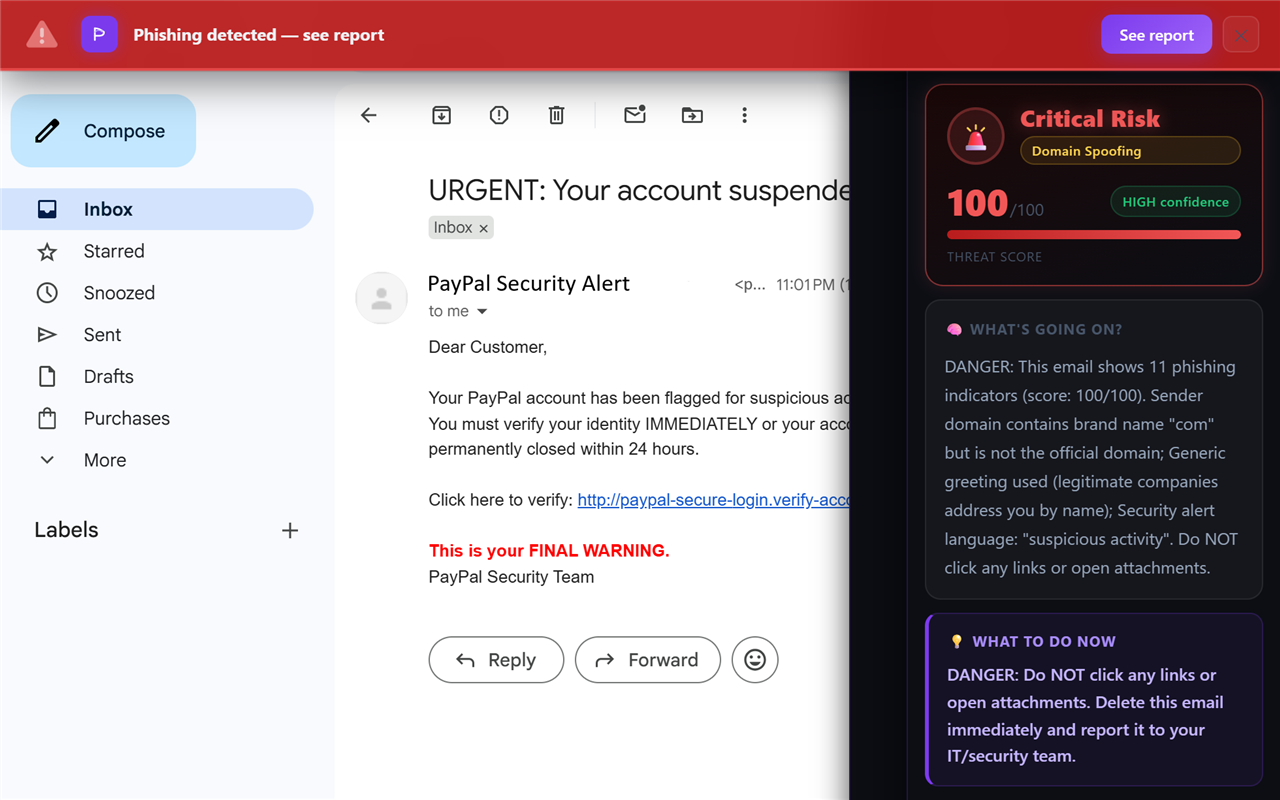
What no tool can promise is catching a compromised real mailbox, because by definition nothing about it is technically wrong. That’s not a gap unique to any one product — it’s the reason out-of-band verification exists. Use a scanner to knock out the spoofing and stranger-invoice cases automatically, and keep the phone-call rule for anything touching payment details. Together they cover both shapes.
What to do if you’ve already paid a fake invoice
Move fast. Contact your bank immediately — if the transfer is recent, they may be able to recall or freeze it. Report it to your local fraud or cybercrime authority. Warn the real supplier, because if their mailbox was compromised, other customers are being targeted too. And if you clicked a link or opened an attachment along the way, follow our step-by-step guide on what to do if you clicked a phishing link, then change any passwords that may be exposed.
Invoice fraud is really just phishing pointed at your accounts payable. The same instincts protect you elsewhere — see how the same playbook drives the fake PayPal email and the Amazon “account suspended” email, both built to rush you into paying or logging in.
Frequently asked questions
How can I tell if an invoice email is real?
Cross-check it against your own records — the invoice number, amount, and work should match something you expected. Confirm the sender’s domain truly belongs to the supplier, don’t open unexpected attachments, and hover over links before clicking. If the invoice asks you to pay to new or changed bank details, verify by phone on a number you already have before sending anything.
A supplier says their bank details have changed — is it safe to pay?
Treat it as a red alert, even if the email looks perfect and comes from the right address, because the supplier’s mailbox may be compromised. Don’t confirm by replying to the email. Call them on a number you already have on file and verify with a person first.
Can antivirus stop a payment-redirect invoice scam?
Often not, because these emails frequently contain no malware and no malicious link — just text requesting a bank-detail change. There’s nothing for antivirus to detect. The real protection is process: out-of-band verification of any payment change.
Keep reading
- How to spot a fake PayPal email — The invoice scam’s favorite disguise gets its own guide.
- The 8 warning signs of a phishing email — The checks that expose almost every fake, invoice or not.
- Free email header analyzer — See where a suspicious invoice really came from.
- The best anti-phishing browser extensions — The tools that catch emails like this one, compared side by side.
Catch the spoofed invoices automatically
Phixo is a browser extension that checks the email open in your Gmail or Outlook across sender and domain reputation, reply-to and link mismatches, lookalike domains, and email authentication (SPF, DKIM, DMARC) — plus an AI read of the language — and explains, in plain English, why it flagged anything. It won’t catch a genuinely compromised mailbox (nothing can), so keep the phone-call rule for bank-detail changes — but it takes the spoofed and lookalike invoices off your plate. Free plan includes 10 scans a day, no credit card. A one-time Google or Microsoft sign-in keeps your scan count tied to your account.
Install Phixo free →Your email body is never stored. Analysis happens in real time and is discarded immediately.