Published 11 July 2026 · ~7 min read · By the Phixo team
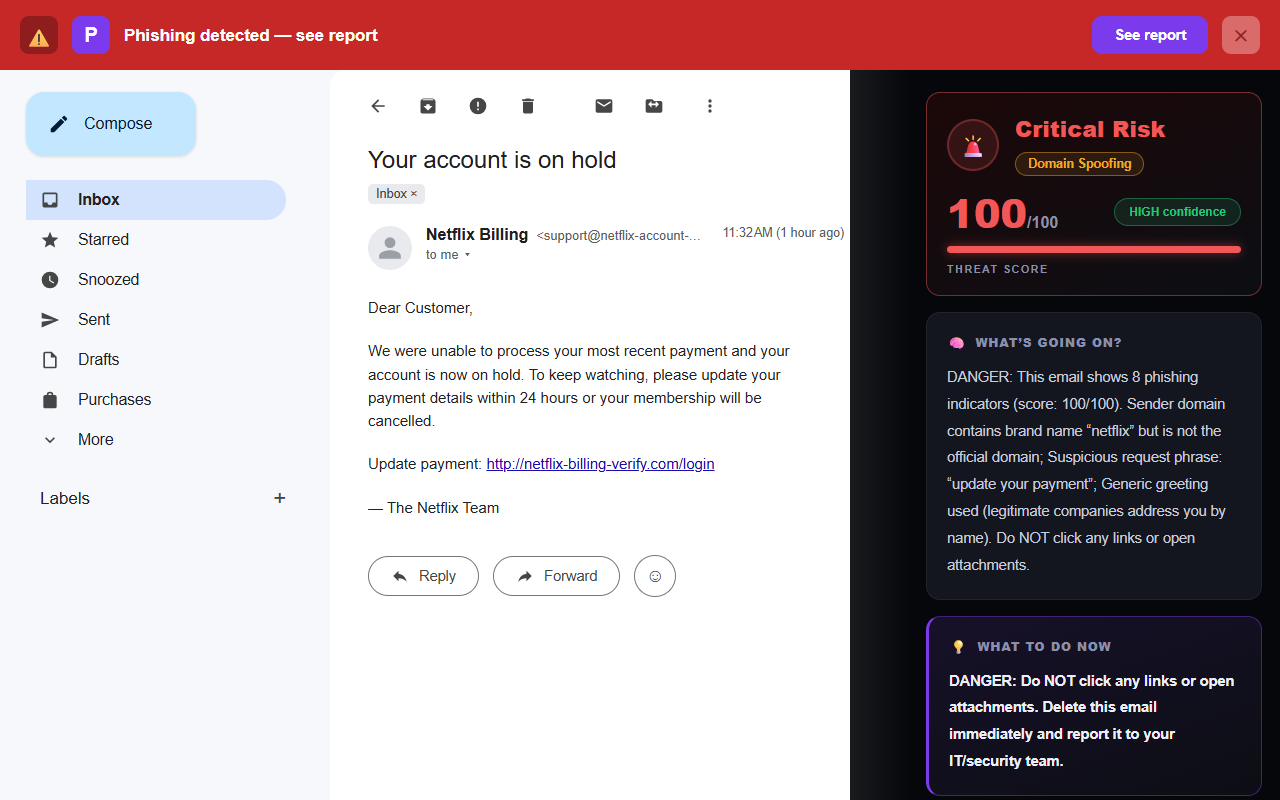
An email lands saying Netflix couldn’t take this month’s payment. Your card was declined, your account is on hold, and unless you “update your payment details” in the next day or two, your membership will be cancelled. It feels plausible — cards do expire, payments do fail — and that plausibility is exactly what the scammer is counting on.
The Netflix payment failed email is one of the most widely copied phishing templates there is, because nearly everyone either has Netflix or knows someone who does. The good news: real Netflix billing emails follow consistent rules, and the fakes almost always break one. Here’s how to check in under a minute — without clicking anything in the email.
The quick answer
Treat the email as fake if any of these are true: it comes from an address that isn’t on netflix.com, it pushes a deadline (“cancelled in 24 hours”), its links point anywhere other than netflix.com, it greets you generically instead of by your account name, or it asks you to “confirm” your card, password, or a verification code. The single most reliable move: don’t click the email at all. Open a fresh tab, type netflix.com yourself (or open the Netflix app), and check your membership and billing status. If your account looks normal, the email was fake.
What a real Netflix email does
- It comes from an address on netflix.com. Genuine Netflix mail is sent from an address on the netflix.com domain. A sender like netflix-billing.com or account-netflix.net is not Netflix, however convincing the red logo looks.
- It addresses you by your account name. Netflix knows who you are, so real billing emails greet you by the name on the account rather than “Dear Customer” or “Dear User.”
- It never asks you to enter payment details through the email. Netflix won’t ask for your full card number, bank details, password, or a one-time code inside an email or via an attachment. When you genuinely need to update a card, you do it after logging in on the site or app.
- It matches what you see when you log in. A real billing problem also shows up in your account — you’ll see it under your membership and billing details at netflix.com. If the email isn’t reflected there, it isn’t from Netflix.
7 signs of a fake Netflix email
1. The sender isn’t on netflix.com
The display name — “Netflix,” “Netflix Billing,” “Netflix Support” — is trivial to fake. The address behind it is harder. Tap or click the sender name to reveal the full address and read the part after the @.
<support@netflix-account-update.com>
Real Netflix mail is sent from an address on netflix.com. Anything with extra words bolted on — netflix-account-update.com, secure-netflix.info — is a lookalike, no matter how polished the email looks.
2. A generic greeting
“Dear Customer.” “Dear Netflix User.” “Hello, valued member.” Because these blast out to enormous lists at once, scammers usually don’t know your name. A genuine Netflix billing email addresses you by the name on your account. A vague greeting with no personal detail is a warning sign.
3. Manufactured urgency
“Your account will be cancelled in 24 hours.” “Final notice — update your payment immediately.” Fear that overrides thought is the engine of the attack. A real payment hiccup gives you room to fix it whenever you next log in; it doesn’t run a countdown clock designed to stop you checking. If a message is racing you toward a button, slow down.
4. Links that don’t go to netflix.com
Before clicking, hover over the button or link (or press and hold on mobile) to preview the true destination. The text may say “Update payment” while the real link points somewhere else entirely.
Actual destination: http://netflix-billing-verify.com/login
A genuine Netflix link lives on netflix.com. If the destination is a different domain, a shortened URL, or a raw IP address, don’t click.
5. A lookalike domain
The best fakes use domains built to survive a quick glance — typosquatting, often with homoglyphs (characters that look identical but aren’t).
netffix.com (a doubled “f” posing as “fl”)
netflix-billing.com (extra word bolted on)
When a domain almost looks right, read it again character by character — especially on a phone, where the address bar is short and easy to skim.
6. It asks you to “confirm” payment or login details
The whole purpose of a phishing page is to capture what you type. Any Netflix email that routes you to a form for your password, full card number, bank details, or a security code should be treated as hostile. Netflix simply doesn’t collect those through email.
7. An unexpected attachment
An “invoice,” a “billing statement,” a “payment form” — attachments are a classic malware delivery method, and Netflix billing emails don’t rely on them. Be wary of .zip, .html, and Office files that ask you to “enable content.” If you weren’t expecting a file, don’t open it.
The 30-second Netflix email check
- Is the sender address actually on netflix.com?
- Does it greet me by my account name, or something generic?
- Is it trying to rush or scare me with a deadline?
- Where do the links actually point?
- Is it asking me to confirm a card, password, or code?
- When unsure — can I just open netflix.com or the app and check myself?
The one check that settles it
Here is the move that beats every version of this scam, no matter how good the copy is: don’t interact with the email. Open a new browser tab and type netflix.com yourself, or open the Netflix app on your phone or TV. Sign in the way you normally do, then look at your membership and billing status.
If your account looks normal and your next billing date is showing as usual, the email was fake. A genuine payment problem would be waiting for you there, with a clear prompt to update your card — on Netflix’s own page, not through a link someone emailed you.
This works because it takes the attacker’s link out of the loop entirely. You’re no longer judging whether an email is real; you’re going straight to the source. Bookmark netflix.com and use the bookmark, so you’re never tempted to search and click an ad that impersonates the login page.
What if you already entered your card details?
Don’t panic — act quickly, in this order:
- Contact your bank or card issuer. Tell them the card may be compromised. They can watch for or block fraudulent charges and reissue the card. This is the single most important step, because a captured card is what the scammer actually wanted.
- Change your Netflix password on the real netflix.com — and change it anywhere you reused that password, since reused passwords are the next thing attackers try.
- Turn on any available account protections and, in your Netflix account, sign out of all devices if you’re worried someone else got in.
- Watch your statements for the next few weeks. Fraudsters often test a stolen card with a small charge before a large one, so flag anything you don’t recognise, however tiny.
For a calm, step-by-step walkthrough of the whole cleanup — including what to do if you clicked a link or downloaded something — see our guide on what to do if you clicked on a phishing link.
“But I don’t even have Netflix”
If you got a “your Netflix payment failed” email and you don’t have a Netflix account, that’s a dead giveaway it’s a scam. These campaigns blast the same message to millions of addresses, most of which aren’t members. There’s nothing to fix and nothing to click — just report it as phishing and delete it.
What to do with a fake Netflix email
Don’t click, don’t reply, and don’t open attachments. Then:
- Report it to Netflix. Netflix asks people to forward suspicious messages to its phishing-reporting address; you can find the current address and steps in the Security section of the Netflix Help Center (netflix.com/security).
- Report it to your email provider. Gmail and Outlook both have a one-click “Report phishing” option, which helps protect other people too.
- Delete it. Once reported, remove it so you don’t click it later by accident.
- Check your account the safe way. If you’re still unsure, log in at netflix.com directly — never through the email.
This is the same playbook that works for the other big brand-impersonation lures. If you want to get sharper at spotting them, our guides on how to tell if an email is phishing and the Amazon “account suspended” scam walk through the same signals in different disguises. And if you like reading the technical evidence yourself, our free email header analyzer shows you where a message really came from.
Frequently asked questions
Does Netflix email you when a payment fails?
Yes — which is exactly why this scam works. Netflix does send billing emails about genuine declined payments. The difference is that a real notice comes from an address on netflix.com, greets you by your account name, and never asks you to enter your card or password through a link in the email. To be sure, ignore the email’s links and check your membership and billing directly at netflix.com or in the app.
How can I tell if a Netflix email is real or fake?
Check the sender address (real Netflix mail is on netflix.com), the greeting (real ones use your account name), the links (they should stay on netflix.com), and whether it’s rushing you. Any request to “confirm” your card, password, or a code through the email is a red flag. The surest test is to open netflix.com yourself and see whether your account actually shows a problem.
What should I do if I entered my card details on a fake Netflix page?
Contact your bank or card issuer right away so they can watch for or block fraudulent charges and reissue the card. Then change your Netflix password — and anywhere you reused it — on the real site, and keep an eye on your statements for small test charges over the following weeks.
Why did I get a Netflix email when I don’t have Netflix?
Because it’s a scam sent to a huge list of addresses regardless of who has an account. If you’re not a Netflix member, there’s nothing to fix — don’t click anything, just report it as phishing and delete it.
Keep reading
- Is that Google "security alert" real? — The security-alert twin of this scam, dissected.
- Is that Amazon "account suspended" email real? — Same playbook — plus the text-message and call-back variants.
- What to do if you clicked a phishing link — Already clicked? Damage control, step by step.
- The best anti-phishing browser extensions — The tools that catch emails like this one, compared side by side.
Not sure about an email? Let Phixo check it
Phixo is a browser extension that checks the email open in your Gmail or Outlook against several of the signals above — sender and domain reputation, email authentication (SPF, DKIM, DMARC), link and Google Safe Browsing checks, and lookalike domains — plus an AI read of the language, and flags anything suspicious in seconds. Free plan includes 10 scans a day, no credit card. A one-time Google or Microsoft sign-in keeps your scan count tied to your account.
Install Phixo free →Your email body is never stored. Analysis happens in real time and is discarded immediately.