Published 22 August 2026 · ~9 min read · By the Phixo team
If you run payroll for a small firm — as the bookkeeper, the office manager, a fractional CFO, or the person who happens to own the payroll software — there’s a scam built specifically for your inbox. It doesn’t involve malware or a dramatic hack. It’s a short, polite email that looks like it came from one of your own employees, asking you to update where their paycheck is deposited. Make the change, and the next payroll run pays the attacker instead of your colleague.
This is the direct deposit change scam — also called payroll diversion fraud — and it’s a quieter cousin of the vendor and wire scams we cover in our guide to phishing protection for accounting firms. It’s worth its own guide because the target isn’t a big supplier payment someone might scrutinise; it’s a routine HR admin task that feels too small to double-check. The FBI’s Internet Crime Complaint Center (IC3) tracks payroll diversion as a recurring form of business email compromise, precisely because the request looks so ordinary. And unlike the tax-season W-2 scam, this one runs all year — every pay cycle is another opportunity.
How the direct deposit change scam works
The mechanics are simple, which is what makes it effective. An attacker picks a target employee — often someone whose name is easy to find on a company website, LinkedIn, or an email signature. Then they email whoever handles payroll, impersonating that employee, and ask to reroute their direct deposit to a “new” bank account. That account is the attacker’s, or a money-mule account they control.
They almost never ask for anything that would trip an alarm. There’s no link to click, no attachment, no password request — just a friendly note about switching banks. The whole play rests on one thing: getting you to edit a field in your payroll system on the strength of an email alone. The timing is usually deliberate too, landing a day or two before payroll runs so there’s pressure to “get it in before Friday” and less time to check.
The most common version: a lookalike of your employee
Most of the time the email doesn’t come from the employee’s real address at all. It comes from a free-webmail account built to look like them — their name in the display field, and an address that’s close enough to pass a glance.
<john.carter.payroll@gmail.com> (his real address: jcarter@yourfirm.com)
Subject: Updating my direct deposit
Body: “Hi — I’ve just switched banks and closed my old account. Could you update my direct deposit to the details below before this Friday’s payroll so I don’t miss it? I’m in meetings most of today so email is easiest — thanks so much!”
Every element is doing a job. The display name reads as the real person. The banking change is the entire point. The deadline (“before Friday’s payroll”) manufactures urgency. And the “I’m in meetings, email is easiest” line is not a throwaway — it exists to pre-empt the one thing that would expose the scam: you picking up the phone.
The harder version: a compromised real mailbox
Sometimes the request genuinely comes from the employee’s real address, because the attacker has taken over their actual mailbox — usually via a phished password. Now the sender is correct, the email history is real, and the writing style may even match. There is nothing technically wrong with the message. We’ll come back to why this case matters so much, because it’s the reason a phone call — not software — has to be your last line of defence.
The client-payroll variant: it’s not just your own staff
If your firm runs payroll for clients, the same scam gets pointed at you from the outside. An attacker impersonates one of your client’s employees — or the client’s HR contact — and asks you to change a deposit for someone on that client’s payroll. You may never have met the employee whose details are being changed, which makes verification harder and the attacker’s odds better.
<m.lindqvist.hr@outlook.com> (not her Northwind Trading work address)
Subject: Banking update for one of our staff
Body: “Hi — one of our team, Daniel Reyes, has changed banks and needs his direct deposit updated for this cycle. New account details attached. He asked me to sort it as he’s on leave. Can you action today?”
Here the attacker leans on the gap between three parties: you, your client, and the employee. “He’s on leave, I’m handling it for him” conveniently removes the one person who’d notice their pay went missing. For a payroll firm the fix is the same rule, applied to the right person: confirm the change with a known, on-file contact at the client — not the person who emailed, and not a number from the email.
The red flags, at a glance
When a “please change my direct deposit” email arrives, run through these before you touch the record:
- The sender address doesn’t match. It’s a free-webmail account (gmail.com, outlook.com) or a lookalike of the employee’s domain, not their normal work address.
- It asks to change bank or deposit details — the one thing every version of this scam has in common.
- The timing is tied to the payroll run. “Before Friday,” “in time for this cycle,” “this month’s pay” — urgency that discourages a second look.
- There’s a built-in excuse not to talk. “I’m travelling / in meetings / my phone’s broken / just email me.” This is the tell that gives it away most often.
- The reply-to address differs from the sender. You reply expecting the employee and it quietly routes to a different mailbox.
- The new account looks off — a bank the person has never used, a pre-paid card provider, or an account in a different name.
The scam’s whole strategy is to feel too routine to verify. A direct deposit update isn’t a $50,000 wire; it’s a five-second edit in a form. That’s exactly why it slips through — nobody thinks a small HR change is worth a phone call. Deciding, in advance, that it always is worth one is what breaks the attack.
The one rule that stops it: verify out-of-band, every time
There is a single control that defeats almost every version of this scam, including the compromised-mailbox case: never action a banking change on an emailed request alone. Confirm it by voice, out-of-band, first.
“Out-of-band” means using a channel other than the email that made the request. Call the employee on the number already in your HR or payroll records — not a number in the email, which just connects you to the scammer. Speak to them, and have them verbally confirm they asked for the change and read you the new details. A thirty-second call ends the entire attack, because the real employee will say “I never sent that,” and the attacker can’t answer a phone that isn’t theirs.
For a small team, turn that instinct into a few written rules everyone follows:
The payroll-change verification workflow
- Treat every direct-deposit or banking change as unactioned until a person has confirmed it verbally.
- Call back on the number already on file — never a phone number or link from the email itself.
- If you can’t reach them by phone, confirm through a second channel you know is theirs (a known mobile, an in-person check, your payroll portal’s own message) — not by replying to the email.
- Require dual approval for any banking-detail change, so no single person can action it alone.
- For client payroll, verify with a known contact at the client, not whoever sent the request.
- Never let “before payroll runs” urgency shortcut the check — a delayed deposit is fixable; a diverted one often isn’t.
Write it down, agree it once, and make it boring. When the callback rule is simply “how we do banking changes,” nobody has to make a judgement call under pressure in the moment — which is exactly the situation the attacker is trying to create.
Where a tool helps — and where it can’t
Let’s be straight about the limits, because honesty matters more than a sales pitch. Automated email checks are genuinely good at catching the spoofed and lookalike version of this scam — which is the common one. A scan can flag that a message signed “John Carter” actually came from a free-webmail address rather than his work domain, that the sender is a homoglyph or lookalike of your company’s domain, that the reply-to has been swapped for a different mailbox, or that the email failed its authentication checks (SPF, DKIM, DMARC). Those are exactly the signals that separate an impersonator from the real person, and they land as a warning at the moment the request is opened — before anyone edits a payroll field.
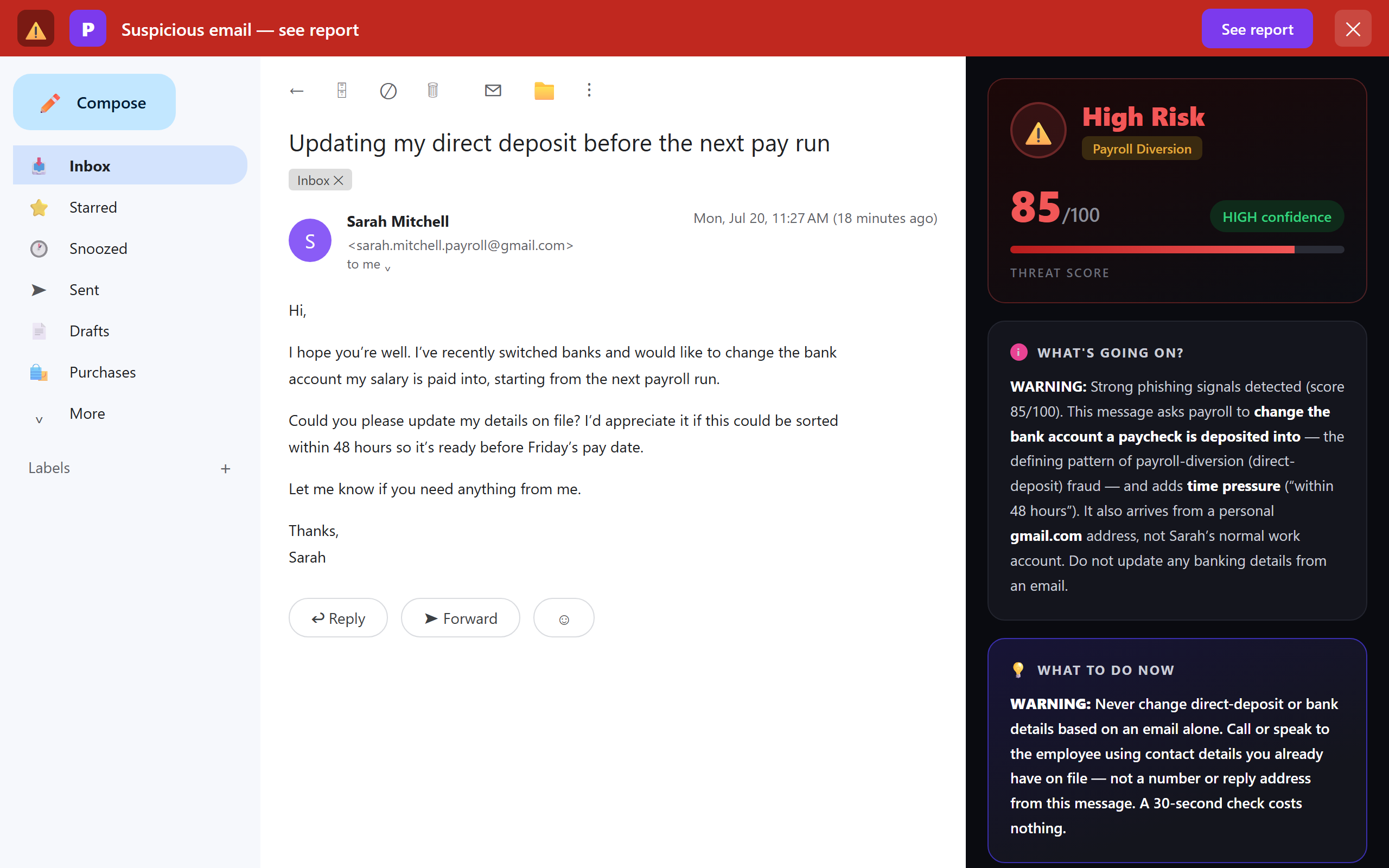
What no tool can promise is catching a request sent from the employee’s genuinely compromised real mailbox — when an attacker is signed into their actual account and emails you from the correct address. By definition, nothing about that message is technically wrong: the sender matches, authentication passes, the history is real. That’s not a gap in one product; it’s the reason the callback rule has to be your primary defence. Use a scanner to knock out the spoofed and lookalike attacks automatically, and keep the phone-call rule for every banking change, no exceptions. Together they cover both shapes of the scam. If you want to see where a suspicious message truly originated, our free email header analyzer reads the raw headers for you.
Protecting payroll with no IT department
Most security advice assumes you have an IT team, an admin console, and a mail-server gateway to configure. A small firm has none of those and doesn’t need them. For a team of a few people handling payroll, the realistic, effective stack is:
- The written verification workflow above — agreed once, followed by everyone. It’s free, and it’s your strongest control against the compromised-mailbox case that no software can catch.
- Multi-factor authentication on every mailbox and on your payroll and accounting software, so a stolen password alone can’t take over an employee’s account and send the “real” version of this email.
- A per-person check in the inbox that flags spoofed and lookalike senders as each email is opened — so whoever reads the “update my direct deposit” request gets a warning at the exact moment it matters, without waiting on anyone else.
That last layer is where a browser extension like Phixo fits. It’s deliberately a personal tool, not an enterprise gateway — and for a small firm that’s the strength, not a limitation. Each person installs it themselves in a couple of minutes and is protected in their own Gmail or Outlook, with no server to configure, no admin console, and no seat minimum to negotiate. If you want the wider context, our honest comparison of anti-phishing browser extensions lays out the options side by side.
What to do if a paycheck was already diverted
If a deposit has already gone to the wrong account, move fast — the first hours matter most. Contact your bank and your payroll provider immediately and ask them to try to recall or reverse the transfer; a same-day catch has a real chance of recovery. Restore the employee’s correct banking details in your system and make sure they’re paid what they’re owed — the loss is yours to resolve, not theirs. Report the incident to the FBI’s IC3 (or your country’s fraud authority), which also helps track the mule accounts involved.
Then close the door behind it. Tell the affected employee, and if the request came from their real mailbox, assume it was compromised: reset the password, turn on multi-factor authentication, and check the account for forwarding rules or filters the attacker may have quietly added to hide replies. If anyone in the chain clicked a link or entered credentials along the way, our step-by-step guide on what to do if you clicked a phishing link walks through the full recovery order.
Payroll diversion is one specific play in a bigger pattern aimed at firms that handle money and data. See our companion guide on phishing protection for accounting firms for the vendor-invoice, wire and W-2 scams that ride the same rails — and our guide to QuickBooks and Intuit phishing emails for the brand impersonation that targets finance software directly.
Frequently asked questions
What is the direct deposit change scam?
It’s a form of business email compromise where an attacker impersonates an employee or contractor and emails payroll, HR or the bookkeeper asking to update their direct deposit details. If the change is made, the next paycheck is routed to the attacker’s account. It usually relies on a spoofed or lookalike email address rather than malware, and often includes an excuse for why the person can’t talk on the phone right now.
An employee emailed asking to change their direct deposit — how do I verify it’s really them?
Don’t reply to the email or use any number it contains. Call the employee on the number already in your HR or payroll records, or confirm through a second channel you know is theirs, and have them verbally confirm the change. Treat the change as unactioned until that happens. This single rule defeats almost every version of the scam — including the case where the request comes from the employee’s real, compromised mailbox.
What are the red flags of a payroll diversion email?
A sender address that’s a free-webmail lookalike of the employee rather than their work address; a request to change bank or deposit details; timing tied to the next payroll run; an excuse for why they can’t take a call; a reply-to that differs from the sender; and an unfamiliar or pre-paid destination account. Any one of these is enough to trigger a phone verification before you touch the record.
What should I do if a paycheck was already redirected to a scammer?
Contact your bank and payroll provider immediately to try to recall the transfer; the first hours matter most. Restore the employee’s correct details and make sure they’re paid. Report it to the FBI’s IC3 or your country’s fraud authority. Tell the affected employee, and if a mailbox was compromised, reset its password, enable MFA, and remove any forwarding rules the attacker added.
Can anti-phishing software stop payroll diversion fraud?
It stops the common version. A per-person inbox check like Phixo flags spoofed senders, free-webmail lookalikes of an employee, reply-to mismatches and failed email authentication as the request is opened. What no tool can catch is a request from an employee’s genuinely compromised real mailbox, because nothing about it is technically wrong — which is exactly why the out-of-band callback rule remains the primary defence, with the tool taking the spoofed cases off your plate.
Keep reading
- Phishing protection for accounting firms — BEC, vendor-invoice fraud and W-2 scams that target firms handling client money.
- QuickBooks & Intuit phishing emails: real or a scam? — The brand impersonation aimed straight at finance teams.
- How to spot a fake invoice email — The two shapes of invoice fraud, and the checks that catch each.
- The 8 warning signs of a phishing email — The checks that expose almost every fake.
- Free email header analyzer — See where a suspicious message really came from.
Catch the impersonator before payroll runs
Phixo is a browser extension that checks the email open in your Gmail or Outlook across sender and domain reputation, reply-to and link mismatches, lookalike domains, and email authentication (SPF, DKIM, DMARC) — plus an AI read of the language — and explains, in plain English, why it flagged anything. Each person on the team installs it themselves; there’s no IT setup and no admin console. It won’t catch a request from a genuinely compromised mailbox (nothing can), so keep the callback rule for every banking change — but it takes the spoofed and lookalike attacks off your plate. Free plan includes 10 scans a day, no credit card. A one-time Google or Microsoft sign-in keeps your scan count tied to your account.
Install Phixo free →Your email body is never stored. Analysis happens in real time and is discarded immediately.