Published 22 August 2026 · ~8 min read · By the Phixo team
If you run a small accounting practice or do the books for a handful of clients, QuickBooks and Intuit emails are just part of the furniture. Invoices, subscription notices, sign-in alerts, tax reminders — you see them every week and you act on them fast. That familiarity is exactly what attackers are counting on. A QuickBooks phishing email doesn’t need to fool a security expert; it needs to catch a busy bookkeeper mid-task, and “your QuickBooks invoice is ready” looks completely normal at a glance.
This guide walks through the three impersonation emails that hit finance people most — the fake invoice, the “account suspended / verify your account” warning, and the “subscription payment failed” notice — then the reliable way to answer the real question: is this Intuit email real, or a scam?
Why QuickBooks and Intuit are perfect phishing bait
Impersonation scams work best when the brand is one you genuinely use and genuinely act on. For an accountant, Intuit ticks every box:
- You expect these emails. A message about an invoice or a subscription doesn’t feel out of place, so it slips past the “why am I getting this?” instinct that catches a random lottery scam.
- Your login is worth stealing. A QuickBooks or Intuit account can hold client financials, payroll, bank connections and tax data. Phishing the password opens all of it.
- You’re often working at speed. Finance work runs on deadlines. Attackers pair that with a countdown — “pay within 24 hours,” “account will be closed” — so you click before you think.
Intuit takes this seriously enough to run a dedicated security site explaining how to recognise its genuine email and report the fakes — you can see it at security.intuit.com. The broader pattern — a trusted brand, an urgent request, a link to a fake login — is the same one the US Federal Trade Commission describes in its guidance on recognising phishing.
Scam 1: the fake QuickBooks invoice
QuickBooks lets real businesses send invoices to their customers by email, complete with a “Review and pay” button. Attackers abuse that exact format. You get what looks like a shared-invoice notification — sometimes for a business you’ve never heard of, sometimes with a plausible amount attached — and a prominent button to view or pay it.
<invoices@quickbooks-billing.com> (real domain: quickbooks.com)
Subject: Invoice #INV-2048 is ready — payment due
Body: “You have a new invoice for $1,940.00. Review and pay before the due date to avoid late fees.”
There are two traps here. One is that you pay a stranger’s invoice outright. The other — more common — is that the “Review and pay” button takes you to a page dressed up as the Intuit sign-in, which quietly harvests your username and password. Sometimes the invoice total is deliberately alarming (a big number you don’t recognise) purely to make you click in a hurry to “dispute” it. This is the same machinery we break down in our full guide to spotting a fake invoice email; the QuickBooks branding just makes it land harder on finance teams.
The move: never pay or “review” from the email. Sign in to QuickBooks yourself and check whether the invoice exists in your account. If it isn’t there, it’s a scam.
Scam 2: “Your Intuit account has been suspended”
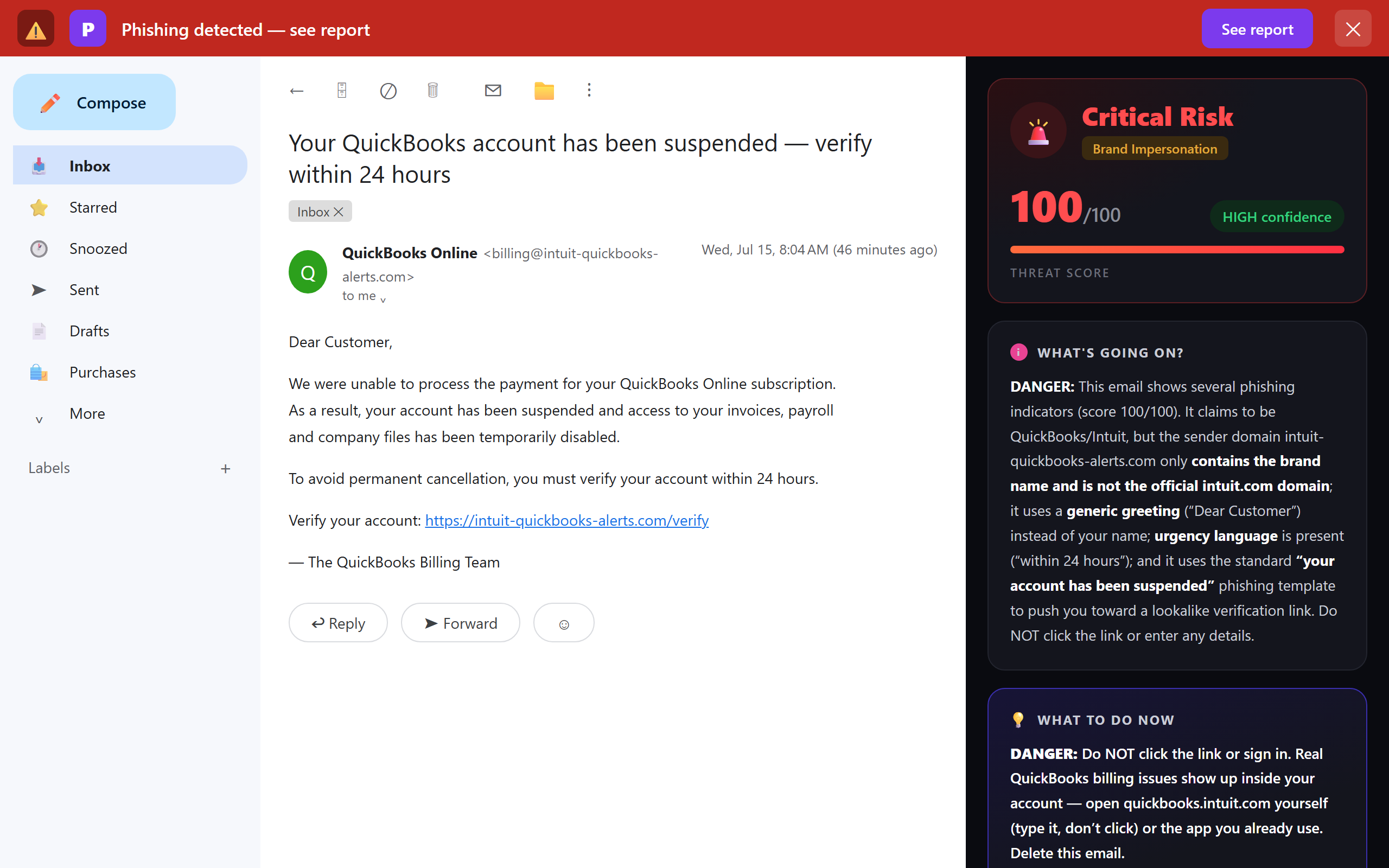
This is the account-takeover play. The email claims your Intuit or QuickBooks account is suspended, locked, or showing “unusual activity,” and you must verify your account or confirm your identity right now to keep access. The link goes to a convincing copy of the Intuit login page.
<no-reply@intuit-secure-verify.com>
Subject: Action required: your account has been temporarily suspended
Body: “We detected unusual sign-in activity. Verify your account within 24 hours or it will be permanently disabled. Confirm your details here.”
Every ingredient is engineered: a security scare to raise your pulse, a deadline to stop you thinking, and a link that looks official. Real providers do occasionally ask you to confirm a sign-in — but they don’t hinge it on a countdown in an email, and they don’t need you to re-enter your full credentials through a link to prove who you are. If there were a genuine problem with your account, it would be waiting for you when you log in normally.
Scam 3: “Your subscription payment failed”
The third variant targets your billing details rather than your login. It says your QuickBooks or TurboTax subscription payment didn’t go through and your service will be interrupted unless you “update your payment method.” The update page is a card-harvesting form.
<billing@intuit-account-update.com>
Subject: Payment failed — update your billing to avoid interruption
Body: “We couldn’t process your subscription renewal. Update your payment details now to keep your account active.”
The tell is the same across all three: the email is trying to move you to a page and get you to type something — a password, a card number, a login. A genuine billing problem is visible and fixable inside your account’s billing settings, which you can reach without touching the email at all.
What a real Intuit email looks like — and the one rule that beats the fakes
Genuine QuickBooks and Intuit messages come from Intuit’s own domains — intuit.com and quickbooks.com (including their subdomains). Scam versions almost always give themselves away in the sender address: a lookalike that adds or swaps characters (quickbooks-billing.com, intuit-secure-verify.com), a legitimate-looking word bolted onto an unrelated domain, or a plain free-webmail address. Intuit keeps its own current guidance on genuine sender addresses at security.intuit.com — when a message matters, check there rather than trusting the email in front of you.
The rule that makes almost all of this moot: don’t act from the email — act from the app. Whatever a QuickBooks or Intuit email is telling you (an invoice, a suspension, a failed payment), open QuickBooks or your Intuit account the way you always do — your bookmark, or by typing the address yourself — and check there. A real invoice, a real security notice, a real billing issue will all be waiting for you inside. A scam has nothing to show, because it only ever existed in the email.
The red flags, at a glance
When an Intuit or QuickBooks email lands and something feels slightly off, run through these:
- Sender domain: is the real address on intuit.com or quickbooks.com — not a hyphenated lookalike or a free webmail account?
- Manufactured urgency: “suspended,” “within 24 hours,” “permanently disabled,” “avoid late fees.” Pressure is the scammer’s core tool.
- Link destination: hover over the button. Does the URL point at an Intuit domain, or somewhere else dressed up to look official?
- An invoice or business you don’t recognise, or an amount that doesn’t match anything you’re expecting.
- A request to re-enter your password or card through a link, to “verify” or “reactivate” something.
The 30-second QuickBooks / Intuit email check
- Is the sender’s real address on intuit.com or quickbooks.com — not a lookalike?
- Is it rushing me with a suspension, deadline or “payment failed” warning?
- When I hover the button, does the link actually point at an Intuit domain?
- Am I about to type a password or card into a page I reached from this email?
- Have I checked inside QuickBooks / my Intuit account directly, instead of trusting the email?
Where a tool helps — and where it can’t
Let’s be straight about the limits, because that matters more than a sales pitch. Automated email checks are genuinely good at the impersonation cases above: a scan can flag that a “QuickBooks” message actually came from a lookalike domain rather than Intuit, that the reply-to address doesn’t match the sender, that a “Review and pay” link points somewhere other than Intuit, or that the message failed its email authentication checks (SPF, DKIM, DMARC). Those are exactly the signals that separate a real Intuit notice from a convincing copy.
What no tool can promise is catching a scam with no technical tells — for example, a real business’s genuinely compromised QuickBooks account sending you a real-looking invoice from a correct address, or a message so plain that nothing about it is technically wrong. By definition, automated signals have nothing to grab onto there. That’s not a gap in one product; it’s the reason the “open the app directly” habit exists. Use a scanner to knock out the spoofed and lookalike attacks automatically, and keep the verification habit for anything that asks for money, a password or card details. Together they cover both shapes. If you want to see where a suspicious message truly originated, our free email header analyzer reads the raw headers for you.
Protecting a small firm with no IT department
Most security advice assumes an IT team, an admin console and a mail-server gateway. A small practice has none of those and doesn’t need them. For a firm of a few people, the realistic, effective stack is:
- Two-factor authentication on every Intuit and QuickBooks login (and on your email), so a phished password alone can’t open the account.
- The “open the app directly” habit, agreed once and followed by everyone — no acting on invoice, suspension or payment emails via their links.
- A per-person check in the inbox that flags lookalike senders and failed authentication as each email is opened — so whoever reads a “your account is suspended” message gets a warning at the exact moment it matters.
That last layer is where a browser extension like Phixo fits. It doesn’t keep a special list for one vendor — it flags brand impersonation, lookalike and homoglyph domains, reply-to and link mismatches, and authentication failures on any email, which is what a fake Intuit, QuickBooks or Xero notice trips. (Intuit and QuickBooks are among the brands it specifically watches for lookalike impersonation.) It’s deliberately a personal tool, not an enterprise gateway — and for a small firm that’s the strength: each person installs it themselves in a couple of minutes and is protected in their own Gmail or Outlook, with no server to configure and no seat minimum. If you want the wider context, our honest comparison of anti-phishing browser extensions lays out the options side by side.
QuickBooks and Intuit impersonation is one slice of a bigger pattern that targets accounting firms specifically. See our companion guide on phishing protection for accounting firms — the business email compromise, vendor-invoice and W-2 scams built around the fact that your firm moves client money.
What to do if you already clicked or entered a password
If you’ve realised after the fact that you entered your Intuit or QuickBooks credentials on a fake page, move quickly: change that password immediately (and anywhere you reused it), turn on two-factor authentication, and check your account’s recent activity and connected bank details for anything you didn’t do. Report the phishing email to Intuit via security.intuit.com, and if money was moved, contact your bank straight away. Our step-by-step guide on what to do if you clicked a phishing link walks through the full recovery order.
Frequently asked questions
Is this QuickBooks or Intuit email real or a scam?
Don’t decide from the email. Check the sender’s real address (genuine Intuit and QuickBooks mail comes from intuit.com and quickbooks.com, not lookalikes or free webmail), whether it manufactures urgency, and where its links actually point when you hover. Then ignore the email’s links entirely and open QuickBooks or your Intuit account yourself. If a real problem exists, it will be waiting for you inside the app.
What email domains do real QuickBooks and Intuit messages come from?
Legitimate notifications are sent from Intuit’s own domains — intuit.com and quickbooks.com, often from subdomains. Scams use lookalikes that swap or add characters (intuit-billing.com, quickbooks-invoices.com, intuit.secure-verify.com) or send from an unrelated address. Intuit publishes current guidance at security.intuit.com; check there rather than trusting one message.
I received a QuickBooks invoice I don’t recognise. What should I do?
Don’t pay it and don’t click “Review and pay.” A fake shared-invoice notification is built to make you either pay a stranger or land on a page that steals your Intuit login. Sign in to QuickBooks directly and check whether the invoice actually exists. If it doesn’t, it’s a scam — report it to Intuit and delete it. If you entered your password on a linked page, change it and enable two-factor authentication.
Is the “Intuit account suspended” or “verify your account” email real?
Almost always it’s a scam. “Account suspended,” “unusual activity” and “verify within 24 hours” are classic phishing pressure lines designed to rush you onto a fake login. Intuit doesn’t hinge account access on an email countdown. Don’t use the link — open your account yourself and check the security area.
How can a small accounting firm protect against QuickBooks phishing without IT?
Two-factor authentication on every Intuit and QuickBooks login, a firm-wide habit of opening the app directly rather than clicking email links, and a per-person inbox check that flags lookalike domains and failed authentication. Phixo is a browser extension each person installs themselves in Chrome or Edge for their own Gmail or Outlook — no server, no admin console — which is why it suits a small firm with no security team.
Keep reading
- Phishing protection for accounting firms — BEC, vendor-invoice fraud and W-2 scams that target firms handling client money.
- How to spot a fake invoice email — The two shapes of invoice fraud, and the checks that catch each.
- The 8 warning signs of a phishing email — The checks that expose almost every fake.
- Free email header analyzer — See where a suspicious message really came from.
Catch the fake Intuit emails before someone types their password
Phixo is a browser extension that checks the email open in your Gmail or Outlook across sender and domain reputation, reply-to and link mismatches, lookalike domains, and email authentication (SPF, DKIM, DMARC) — plus an AI read of the language — and explains, in plain English, why it flagged anything. Each person on the team installs it themselves; there’s no IT setup and no admin console. It won’t catch a scam with no technical tells (nothing can), so keep the habit of opening QuickBooks and Intuit directly — but it takes the spoofed and lookalike attacks off your plate. Free plan includes 10 scans a day, no credit card. A one-time Google or Microsoft sign-in keeps your scan count tied to your account.
Install Phixo free →Your email body is never stored. Analysis happens in real time and is discarded immediately.