Published 15 July 2026 · ~7 min read · By the Phixo team
If you have just realised you typed your password into a fake site, your stomach probably dropped. That reaction is normal — and it is also a good sign, because it means you spotted the problem. Here is the reassuring part: giving your password to a phishing site does not mean you are already hacked. It means someone now has a key they have not necessarily used yet. Your whole job in the next few minutes is to change the lock before they get to the door. Work through the steps below in order — they are arranged by what protects you most, first.
If you only do one thing right now, do this: change the password on the affected account immediately, on the real website — typed in yourself, not clicked from any email. Minutes genuinely matter here more than anything else on this page. Everything below strengthens that, but this single step closes the door.
Step 1: Change that password now — on the real site
This is the one that counts. Stolen passwords are often fed straight into automated login attempts, so the sooner you change it, the more likely the attacker never gets a chance to use it. Two details make the difference:
- Go to the real website directly. Type the address into your browser yourself (for example, google.com or paypal.com) or use a saved bookmark. Never click a link in the email or page that tricked you to “log in and fix it” — that just sends you back to the fake.
- Pick a brand-new password. Not a small tweak of the old one. Something long and unique that you have never used elsewhere.
If the real site lets you, this is also the moment to sign out of all other sessions once you are in — more on that in Step 4. But changing the password comes first. Do it now, then come back to the rest of this list.
Step 2: Change it anywhere you reused that password
Here is the uncomfortable question most people have to face: have I used this same password somewhere else? If the answer is yes — and for most people, it is, somewhere — change it on those accounts too, starting with the important ones: email, banking, anything tied to money or payments.
The reason is a follow-on attack called credential stuffing. Attackers take one stolen email-and-password pair and automatically try it against dozens of popular services, betting that people reuse logins. It is the single most common way one phishing slip turns into several compromised accounts. Breaking the reuse is what stops that cold.
Going forward: a password manager (many are free) lets every account have its own long, unique password without you memorising any of them. It is the one change that makes credential stuffing impossible to land on you again — and it means a slip like today can never spread beyond the single account involved.
Step 3: Turn on two-factor authentication (2FA)
Two-factor authentication is the safety net under a stolen password. Even if an attacker somehow has your new password later, they still cannot get in without the second factor — a code from an app, or a tap on your phone. Turn it on for the affected account now, while you are already in the settings.
Then turn it on for your email account above all else, if it is not already. Your inbox is the master key to everything: whoever controls your email can request password resets for almost every other account you own. Protecting email protects the whole set. An authenticator app or a hardware key is stronger than SMS codes, but any 2FA beats none.
Step 4: Check the account for damage
Once the password is changed and 2FA is on, take two minutes to make sure the attacker did not already leave themselves a way back in. On the affected account, check for:
- Active sessions. Look for a “sign out of all devices” or “where you’re signed in” option and use it — this boots out anyone who may already be logged in.
- Recovery email and phone number. Make sure these still point to you. Attackers sometimes swap them so they can reset the password back later.
- Forwarding rules and filters (for email accounts especially). A common trick is a hidden rule that quietly forwards or deletes your incoming mail. Delete anything you did not set up.
- Recent activity, purchases, or messages. Skim for logins, orders, or sent messages you do not recognise.
If you find something you cannot explain, treat the account as still at risk: change the password again and, for email or banking, contact the provider’s support.
Step 5: If it was bank or card details, call your bank
Money is where speed matters most. If the fake page collected online-banking logins, card numbers, or you actually made a payment, contact your bank or card issuer right away. Explain what happened and ask them to watch for or block fraudulent charges — many can freeze the card and issue a new number on the spot. Change any online-banking password on the real site, switch on 2FA, and keep an eye on your statements over the following weeks. Banks handle this every single day; you will not be the first person to call.
Step 6: If it was a work account, tell IT immediately
This is the step people most want to skip out of embarrassment — and the one where skipping does the most harm. If the account belongs to your employer, tell your IT or security team now, before you do anything else clever. They deal with this constantly and would vastly prefer a heads-up in the first ten minutes to discovering it a week later. Fast reporting lets them force a reset, sign out sessions, and watch for misuse across the organisation. Honesty and speed limit the damage; silence lets it spread. Nobody good at their job will shame you for reporting quickly.
The recovery checklist, in order
- Change the password now — on the real site, typed in yourself.
- Change it anywhere you reused it — email and banking first.
- Turn on two-factor authentication, email account especially.
- Sign out all sessions; check recovery details and forwarding rules.
- Bank or card details? Call your bank right away.
- Work account? Tell IT immediately — speed beats embarrassment.
Take a breath: what this probably did not do
Now that the important actions are done, here is the reassurance you have earned. Entering a password on a fake page usually does not infect your device. A phishing form is just a box that collects whatever you type — it does not install a virus by itself. Unless you also downloaded and opened a file the page offered you, your computer and phone are very likely fine, and you do not need to tear them apart looking for malware.
The risk here is the credential, not your machine. And a credential is something you can neutralise — that is exactly what the steps above did. The vast majority of people who catch this early and change the password in time come out with no lasting harm at all. You reacted, you fixed the lock, and that is the whole game.
One related case worth knowing: if you clicked a link but are not sure whether you actually entered anything, or a file started downloading, the priorities are slightly different. We have a companion guide for that exact situation: what to do if you clicked a phishing link.
How to avoid the next one
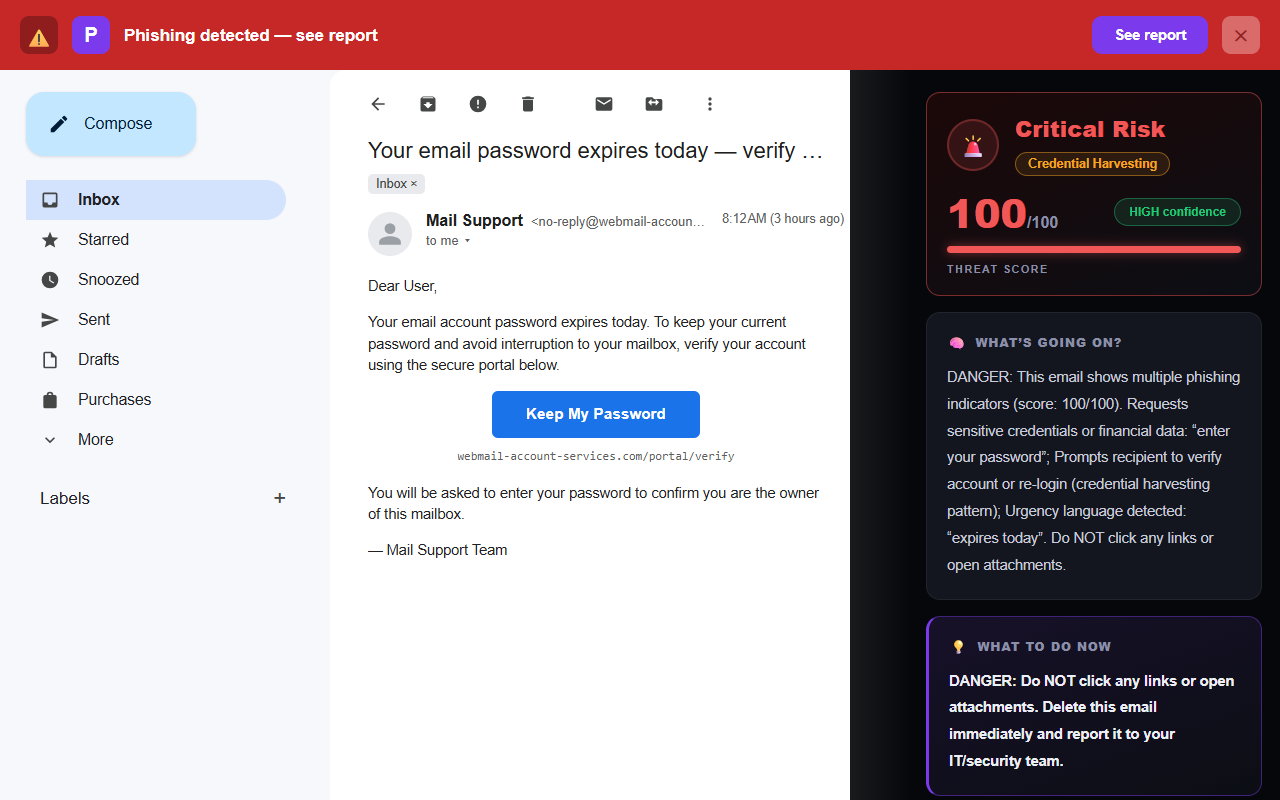
Once the adrenaline fades, the most useful thing you can do is make the next fake page easier to catch — ideally before you ever type into it. Phishing works by rushing you: a scary subject line, a countdown, a login screen that looks close enough. Learning the tells helps a lot. Our guide on how to tell if an email is phishing walks through the signals with real examples, and if you ever want to inspect a suspicious message yourself, the free email header analyzer shows you where it truly came from.
The hard part is not knowing the signs — it is remembering to check every email, every time, when you are busy and moving fast. That is precisely the moment phishing is designed to catch you, and it is why an automatic second set of eyes helps.
Frequently asked questions
I entered my password on a phishing site — am I hacked?
Not necessarily, and typically not yet. Handing over a password gives an attacker the potential to log in, but it does not happen instantly, and most people who act fast contain it fully. The single most important thing is to change that password now, on the real website, before anyone can use it. Then stop the same password working anywhere else and turn on two-factor authentication.
Does entering my password on a fake site infect my computer?
Usually not. A phishing form just collects whatever you type — it does not install anything by itself. The risk is the stolen credential, not a virus on your device. Unless you also downloaded and opened a file the page offered, your computer is very likely fine. Focus your energy on securing the account, not on scanning for malware that probably was not installed.
How fast do I need to change my password?
As soon as you can — minutes matter more than anything else on the list. Stolen credentials are often fed into automated login attempts quickly. Changing the password on the real site before the attacker uses it usually closes the door entirely. If you can only do one thing right now, do this.
I reused that password on other accounts — what do I do?
Change it everywhere you used it, prioritising your email, banking, and anything tied to money. Attackers routinely take one stolen password and try it across dozens of popular sites — this is called credential stuffing, and it is the most common follow-on attack. Going forward, a password manager lets every account have its own unique password so one leak can never unlock the rest.
It was my work account — should I tell IT?
Yes, immediately, even though it feels embarrassing. IT teams deal with this constantly and would far rather hear about it in the first ten minutes than discover it later. Fast reporting lets them force a password reset, sign out active sessions, and watch for misuse. Honesty and speed limit the damage; silence lets it spread.
It was my bank or card details — what now?
Contact your bank or card issuer right away and tell them what happened. Ask them to watch for or block fraudulent charges — many can freeze the card and issue a new number on the spot. Change any online banking password on the real site, turn on two-factor authentication, and keep checking your statements over the following weeks.
Keep reading
- What to do if you clicked a phishing link — The wider recovery checklist beyond passwords.
- The 8 warning signs of a phishing email — Get sharper at catching the next one before you type.
- Free email header analyzer — See where the email that got you really came from.
- The best anti-phishing browser extensions — The tools that catch emails like this one, compared side by side.
Phixo helps you catch the next one before you type
Phixo can’t undo a password you already entered — but it’s built to stop the next fake login from ever getting that far. It’s a browser extension that checks each email you open in Gmail or Outlook against several signals — sender and domain reputation, email authentication (SPF, DKIM, DMARC), Google Safe Browsing, link mismatches and lookalike domains — plus an AI read of the language, then flags anything suspicious with a plain-English reason before you click. Free plan includes 10 scans a day, no credit card. A one-time Google or Microsoft sign-in keeps your scan count tied to your account.
Install Phixo free →Your email body is never stored. Analysis happens in real time and is discarded immediately.