Published 21 July 2026 · ~7 min read · By the Phixo team
The email says your Apple ID has been locked — suspicious activity, unusual sign-in, take action now. For most people that account holds photos, messages, backups, payment methods and the keys to every Apple device they own. The thought of losing it is exactly the lever the message pulls.
And here’s the uncomfortable truth that makes this scam effective: Apple genuinely does lock accounts when it detects unauthorised access attempts. The lock is real Apple behaviour; the email in front of you usually isn’t. Real locks announce themselves when you try to sign in on your device — not through a threatening email with a “verify now” button. Here’s how to tell the difference in under a minute.
The quick answer
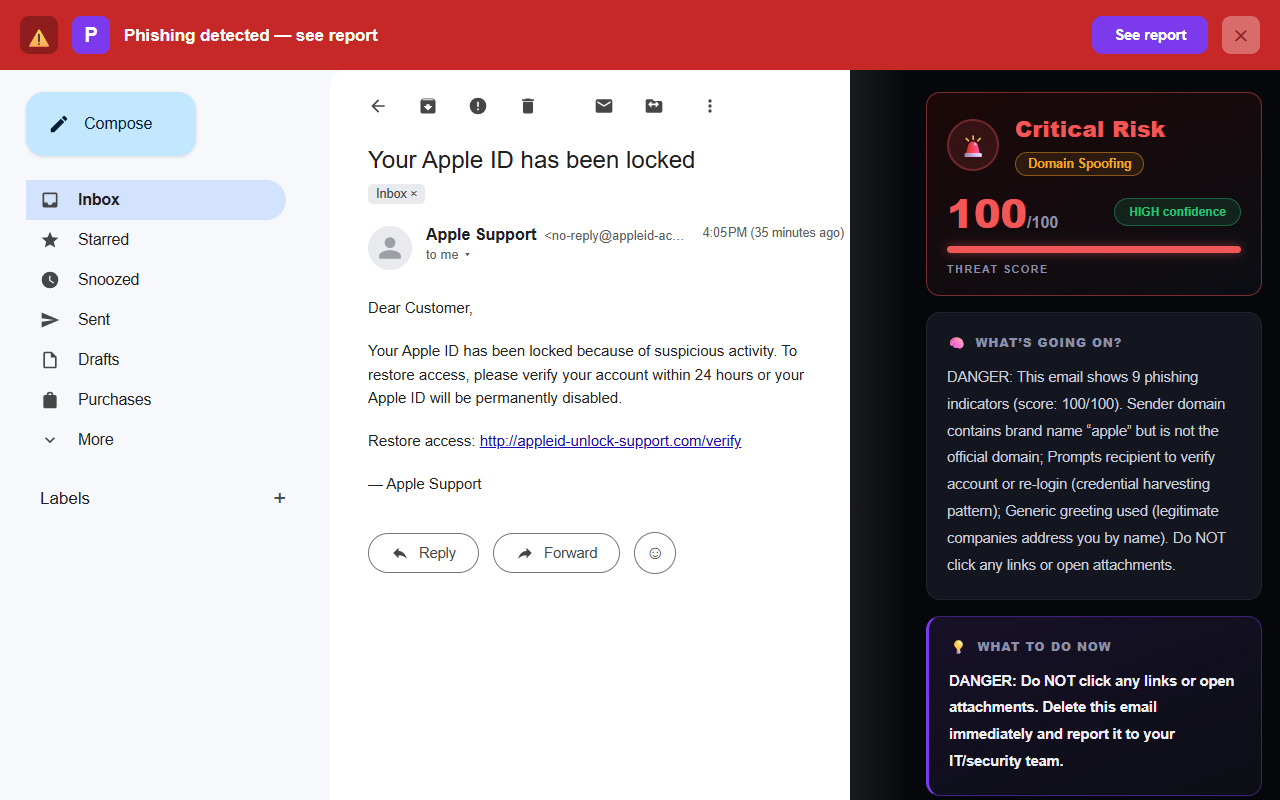
Treat an “Apple ID locked” email as fake if any of these are true: the sender’s domain isn’t apple.com (real notices come from addresses on email.apple.com, id.apple.com and similar), it threatens permanent disabling within 24 or 48 hours, it asks you to “verify” your password or payment details through a link, or it opens with “Dear Customer.” The single most reliable move: don’t click anything in the email. Open Settings on your iPhone or Mac and tap your name, or sign in at account.apple.com in a fresh tab. If your account were really locked, Apple would tell you right there — and if you can sign in normally, the email was the fake.
What Apple really does when an account is locked
Knowing the genuine behaviour makes the fakes obvious:
- You find out at sign-in. A genuinely locked Apple Account announces itself when you (or someone else) tries to use it — on your device, in the App Store, at account.apple.com. The recovery path runs through iforgot.apple.com, Apple’s own unlock service.
- Real emails come from apple.com domains. Notices arrive from addresses on domains like email.apple.com or id.apple.com — subdomains of apple.com. Not appleid-account-security.com, not apple-support-verify.net.
- Apple never asks for the crown jewels by email. No real Apple message asks you to supply your password, verification codes, card details or answers to security questions through an email link. Apple states this plainly in its own security guidance.
- No countdown to deletion. Apple doesn’t threaten to permanently disable your account “within 24 hours” for inaction. Deadlines exist to make you click before you think.
- Real notices use your name. Apple knows who you are. “Dear Customer” in an account-security email is a strong tell the message was blasted to a list.
Naming note: Apple renamed Apple ID to Apple Account in 2024 — scam emails often still say “Apple ID” because the phishing kits are old. That alone doesn’t prove anything (plenty of people still say Apple ID too), but combined with the other signs it fits the pattern: fakes copy yesterday’s Apple.
5 signs of a fake “Apple ID locked” email
1. The sender domain isn’t apple.com
The display name — “Apple,” “Apple Support,” “Apple ID” — is trivial to fake. Tap or click the sender name to reveal the full address and read the part after the @.
<no-reply@appleid-account-security.com>
The registered domain must be apple.com. email.apple.com is Apple; appleid-account-security.com is a stranger’s domain that happens to contain the word “apple.”
2. A deadline and a threat
“Verify within 24 hours or your Apple ID will be permanently disabled.” Apple’s real security process is the opposite of this: a locked account stays locked, safely, until you recover it through iforgot.apple.com. Nothing is deleted for ignoring an email. The manufactured urgency is the attack’s engine.
3. Links that don’t go to apple.com
Hover over the button (or press and hold on mobile) to preview the true destination before clicking.
Actual destination: http://appleid-unlock-support.com/verify
Genuine Apple account links live on apple.com — account.apple.com, iforgot.apple.com. A different domain, a URL shortener, or a raw IP address means don’t click.
4. It asks you to “verify” credentials or payment
The fake page behind the button is a credential harvester: it wants your Apple Account password, and often your card details and security-question answers as a bonus. Real Apple never collects these through an email link — a locked account is recovered through iforgot.apple.com, where Apple verifies you, not the other way round.
5. A generic greeting and subtly off English
“Dear Customer, your account has been locked for security reason.” Apple’s real communications are polished and address you by name. Generic greetings, odd capitalisation and slightly broken phrasing are cheap to fix, yet phishing kits keep shipping them — treat them as the gift they are.
The single safest way to check
Take the email out of the equation entirely — check your account where Apple actually manages it:
- Don’t click any link or button in the email.
- On your device: open Settings (iPhone/iPad) or System Settings (Mac) and tap your name at the top. A real account problem shows up here.
- Or in a browser: open a new tab and type account.apple.com yourself, then sign in.
- If the account is genuinely locked, Apple tells you at sign-in and routes you through iforgot.apple.com to unlock it. If you can sign in normally — the email was the fake.
Report the fake: Apple asks users to forward phishing emails to reportphishing@apple.com. Thirty seconds of your time feeds the takedown pipeline that protects the next person.
This verify-at-the-source habit is the same defence that beats the fake Microsoft “unusual sign-in” email and the fake Google security alert — the three scams are siblings, and one habit defeats them all.
The 30-second Apple email check
- Does the sender address end in apple.com?
- Does it address me by name, or “Dear Customer”?
- Where does the button actually point — apple.com or elsewhere?
- Is it asking me to type a password, code, or payment detail?
- Is it threatening permanent deletion on a deadline?
- When unsure — can I check in Settings or at account.apple.com instead?
Why this fake fools careful people
The Apple version of this scam borrows credibility from two directions at once. The lock itself is real Apple behaviour — accounts genuinely do get locked, so the premise survives a quick mental fact-check. And the stakes are unusually personal: an Apple Account isn’t one service, it’s photos, messages, device backups, saved cards and Find My — a whole digital life behind one password. Fear with a plausible premise is the most effective phishing fuel there is; it’s the same engine behind the fake Netflix “payment failed” email, just with higher stakes.
Appearance won’t separate real from fake — the kits copy Apple’s templates pixel-perfectly. The reliable tells are the ones a template can’t fake: the sender’s registered domain, the true link destination, and whether the problem actually exists when you sign in through Apple’s own front door. For the technical trail, our free email header analyzer shows where a message really came from and whether it passed authentication.
What if you already clicked or entered your details?
Don’t panic — act quickly, in this order:
- Change your Apple Account password now — in Settings on your device, or at account.apple.com (typed by hand). Make it unique.
- Confirm two-factor authentication is on. With 2FA, a stolen password alone can’t take the account.
- Review your signed-in devices — Settings → your name → scroll to the device list — and remove anything you don’t recognise.
- If you entered card details, contact your bank and have the card blocked and reissued.
- Change the password anywhere you reused it, and forward the email to reportphishing@apple.com.
For the full walkthrough — including what to check in the days after — see what to do if you clicked a phishing link.
Frequently asked questions
Does Apple really lock Apple IDs?
Yes — Apple locks an account when it detects signs of unauthorised access or too many failed sign-in attempts. But you usually discover a real lock when you try to sign in, not from a threatening email. Recovery runs through iforgot.apple.com, Apple’s own service.
How can I tell if an “Apple ID locked” email is real or fake?
Check the sender’s real address — genuine Apple email comes from apple.com domains such as email.apple.com or id.apple.com. Treat it as fake if the domain is anything else, if it threatens permanent disabling within hours, if it asks you to verify your password or payment through a link, or if it opens with a generic greeting.
What is the safest way to check?
Don’t click anything in the email. Open Settings on your iPhone or Mac and tap your name, or sign in at account.apple.com in a fresh tab. If the account were really locked, Apple would tell you right there. If you can sign in normally, the email was the fake.
Keep reading
- Is that Microsoft "unusual sign-in" email real? — The same account-scare play against your other master key.
- Is that Google "security alert" real? — The most-copied security email on the internet, dissected.
- What to do if you clicked a phishing link — Already clicked? Damage control, step by step.
- The best anti-phishing browser extensions — The tools that catch emails like this one, compared side by side.
Not sure about an email? Let Phixo check it
Phixo is a browser extension that checks the email open in your Gmail or Outlook against several of the signals above — sender and domain reputation, link mismatches, lookalike domains, and email authentication (SPF, DKIM, DMARC) — plus an AI read of the language, and flags anything suspicious in seconds. Free plan includes 10 scans a day, no credit card. A one-time Google or Microsoft sign-in keeps your scan count tied to your account.
Install Phixo free →Your email body is never stored. Analysis happens in real time and is discarded immediately.