Published 31 July 2026 · ~7 min read · By the Phixo team
Norton and McAfee are the two antivirus names almost everyone recognises, which makes them ideal raw material for a scam. Millions of people have genuinely bought one of these subscriptions at some point, and everyone else can be made to panic about a charge they never approved. The fake renewal email works both crowds at once — and it has become one of the most reported email scams there is.
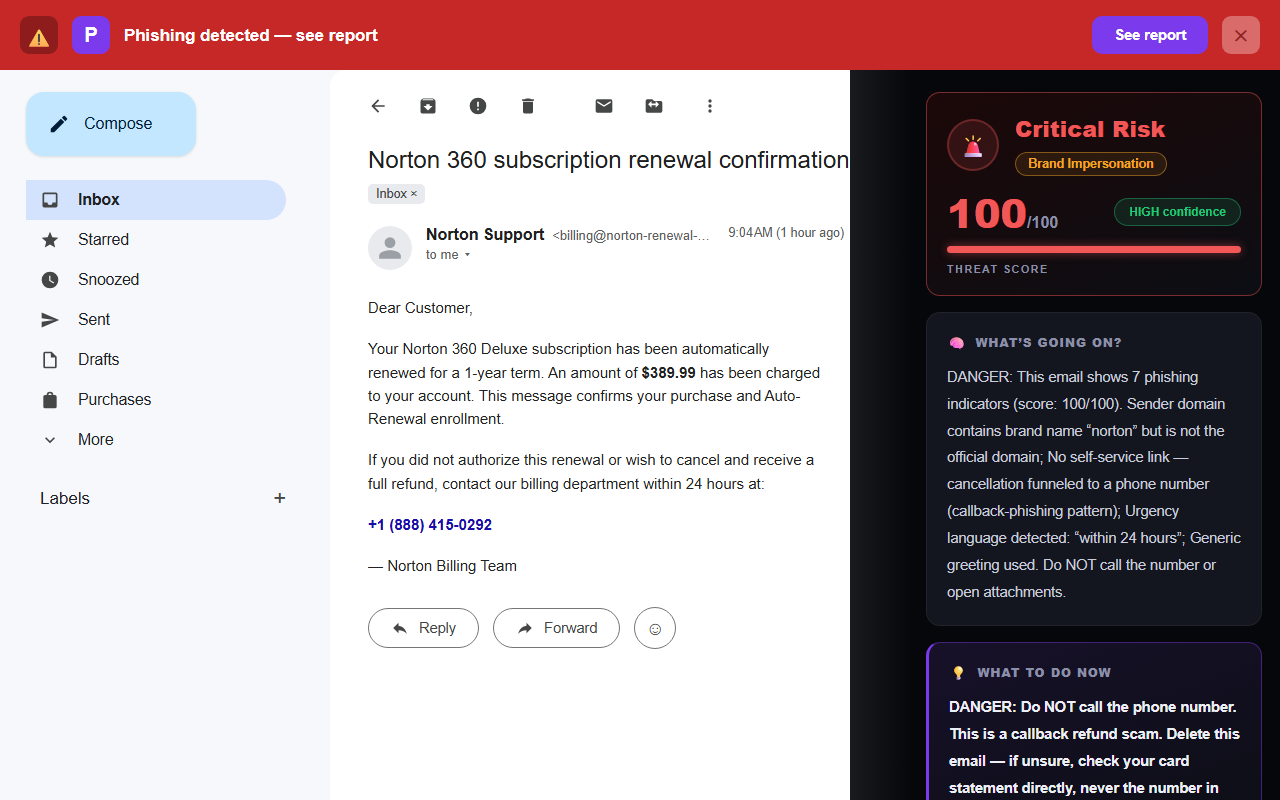
What makes it slippery is what it doesn’t contain. Most phishing advice says “check the link before you click.” This email frequently has no link at all — nothing for a spam filter to blacklist, nothing for your hover-instinct to catch. The whole attack is a phone number. Security people call this pattern callback phishing, and it is the same machine behind the fake Geek Squad renewal email: you call them, which feels safe, and that is precisely the trick.
The quick answer
If you never bought a Norton or McAfee subscription, the email is a scam — full stop. You will not be charged; the scammers don’t have your card. If you do have (or once had) one of these products, still don’t call the number in the email. Check your bank or card statement for an actual charge, and manage the plan by signing in at norton.com (or mcafee.com) directly. A real renewal notice never depends on an urgent phone call to stop a charge — the “call within 24 hours to cancel” pressure is the fingerprint of the scam.
How the scam actually works
The email is only act one. Here’s the full play:
- The bait: a renewal receipt or invoice — typically $299 to $499 — saying the charge will hit your account within hours. Often the “invoice” is a PDF attachment and the email body is nearly empty; the phone number lives inside the PDF, which helps the message slip past filters that scan text.
- The call: a calm, helpful “billing agent” agrees the charge must be a mistake and offers to cancel it and refund you. Because you dialled, your guard is down — this is your call, not theirs.
- The hook: to “process the refund” they need you to install remote-access software, or sign in to your bank while they’re connected, or read out your card number. A favourite script fakes an over-refund — “oh no, we accidentally sent you $4,000 instead of $400” — complete with a doctored bank screen, then pressures you to wire back the difference or buy gift cards to fix “their” error.
Nothing legitimate ever happens on that call. There is no charge, no subscription and no refund. Every minute is engineered toward one of three ends: remote access to your computer, your banking login, or an irreversible payment. You can hang up at any point — mid-sentence, even after saying yes to something. Hanging up costs you nothing.
5 tells of the fake Norton (or McAfee) email
1. You don’t have the subscription
The most obvious tell, and still worth stating plainly: a renewal receipt for a product you never bought is not a billing error — it’s bait. Scammers blast these to millions of addresses knowing most recipients have no plan; the message relies on panic to do the rest.
2. The sender isn’t a norton.com or mcafee.com address
Tap or click the sender name to reveal the full address and read the part after the @. Norton’s real emails come from norton.com or gen.digital (its parent company); McAfee’s from mcafee.com. The fakes come from random Gmail or Outlook addresses, or from invented domains that merely contain the brand word.
<billing@norton-renewal-desk.com> or <nortoninvoice2291@gmail.com>
That second pattern — a global software company’s “billing department” writing from a free Gmail address — is on its own enough to close the email.
3. The only way to cancel is a phone number
Real subscription emails link you to your account to manage or cancel the plan online. An email that offers no self-service option and funnels everything to an urgent phone call is following the callback-phishing script. The absence of links isn’t reassuring here — it’s the tell.
4. A charge that isn’t on your statement
The email says $389.99 “has been debited” or “will be debited within 24 hours.” Your bank statement is the ground truth, and checking it takes one minute in your banking app. No matching charge means no charge exists — the number in the email is pure theatre.
5. Generic greeting, urgent clock
“Dear Customer” plus a 24-hour countdown is the classic pressure pairing. A company that just billed you knows your name — and a genuine receipt doesn’t race you against a deadline, because a real charge has either already happened or hasn’t.
The 30-second antivirus-renewal email check
- Do I actually have a Norton or McAfee subscription?
- Does the sender end in norton.com / mcafee.com — or is it Gmail/a lookalike?
- Is a phone call the only way to cancel?
- Is the charge actually on my card statement?
- Is it “Dear Customer” with a countdown?
Why this one beats link-checking instincts
If you’ve read our guide to the 8 warning signs of a phishing email, you already hover over links and read sender domains. Callback scams are built to route around exactly those habits: there’s no link to hover, and often a throwaway Gmail sender that doesn’t even pretend to be spoofed. The same play powers the Geek Squad version and a wider family of fake invoice emails — a believable bill, plus a number designed to get you on the phone, where there’s no URL bar, no padlock, and no record of what was said.
It’s also why we built the callback pattern into Phixo’s detection directly: it flags a known security-software brand combined with renewal language and a callback number, and it treats “charge language plus a phone number plus no link at all” as a red flag in its own right — because legitimate renewal emails always give you a way to manage the plan online.
What to do with a fake Norton email
- Don’t call the number — and don’t open the attachment if there is one.
- Report it: use “Report phishing” in Gmail or Outlook. In the US you can also file at reportfraud.ftc.gov.
- Delete it, so you don’t revisit it in a weaker moment.
- If you’re genuinely unsure whether you have a plan, sign in at norton.com or mcafee.com directly, or check your card statement — never through anything in the email.
What if you already called — or let them in?
Take a breath; recovery is very doable if you move now, in this order:
- Hang up, and don’t answer follow-up calls from that number. Scammers re-dial “to finish your refund.”
- If you installed anything (AnyDesk, TeamViewer, UltraViewer, a “support tool”): disconnect the computer from the internet, uninstall the program, restart, and run a malware scan before using the machine for anything sensitive.
- If they saw your bank or you read out a card number: call your bank or card issuer now — the number on the back of your card — and tell them exactly what happened. They can freeze the card and watch for or reverse transfers.
- If you paid by gift card or wire: report it to the gift-card company and your bank immediately — speed matters more than anything else here — and file at reportfraud.ftc.gov.
- Change passwords from a different, clean device for any account you touched while they were connected, starting with your email and bank. Our step-by-step recovery guide walks through the full checklist calmly.
Frequently asked questions
I never subscribed to Norton — will I actually be charged?
No. The scammers don’t have your card; the “charge” is invented to make you call. Check your bank statement if you want certainty — no matching charge means nothing happened. There is nothing to cancel and no one to call.
What happens if I call the number?
A convincing “agent” offers to cancel and refund the charge, then needs you to install remote-access software, log in to your bank while they watch, or read out card details to “process the refund.” A common variant fakes an over-refund and pressures you to send the difference back by wire or gift cards. Hang up at any point — nothing legitimate happens on that call.
How do I tell a real Norton or McAfee email from the scam?
Real ones come from norton.com / gen.digital or mcafee.com addresses and let you manage any plan by signing in online. A random Gmail sender, a lookalike domain, an invoice-in-a-PDF, or “cancel by phone within 24 hours” each mark it as fake. To see the technical trail, our free email header analyzer shows where a message really came from.
How do I report it?
Hit “Report phishing” in Gmail or Outlook, and in the US file at reportfraud.ftc.gov. Then delete the email. If money or access was lost, contact your bank first — then report.
Keep reading
- The Geek Squad “renewal” email scam — The same callback scam in a different costume.
- How to spot a fake invoice email — The wider family of bills designed to make you panic.
- What to do if you clicked a phishing link — Gave them access or details? Recovery, step by step.
- The best anti-phishing browser extensions — The tools that catch emails like this one, compared side by side.
Not sure about an email? Let Phixo check it
Phixo is a browser extension that checks the email open in your Gmail or Outlook — including no-link callback scams like this one, which it catches by pattern: brand + renewal claim + phone number. It also checks sender and domain reputation, link mismatches, lookalike domains, and email authentication (SPF, DKIM, DMARC), plus an AI read of the language. Free plan includes 10 scans a day, no credit card. A one-time Google or Microsoft sign-in keeps your scan count tied to your account.
Install Phixo free →Your email body is never stored. Analysis happens in real time and is discarded immediately.