Published 20 August 2026 · ~8 min read · By the Phixo team
The message says you’ve broken a rule — a copyright complaint, an “intellectual property violation,” sometimes “impersonation” or “suspicious activity.” It says your Instagram account will be disabled within 24 hours unless you appeal. The appeal is a link. The link opens a page that looks exactly like Instagram and asks you to log in, then often to type the code from your authenticator app “to confirm your identity.” That login form is the entire scam: it captures your password and 2FA code and hands the attacker everything they need to take the account over for real.
It works because the threat is believable. Instagram does enforce copyright, does disable accounts, and does send emails about it. And if your account is your storefront, your portfolio or your audience, losing it feels catastrophic — the exact state of mind phishing needs. The good news: this fake is one of the easier ones to expose, because Meta gives you a way to check that doesn’t involve the email at all.
The quick answer
Treat the message as fake if any of these is true: the sender isn’t on a real Meta domain like mail.instagram.com or facebookmail.com; the “appeal” link goes anywhere other than instagram.com; it demands action “within 24 hours”; it greets you as “Dear User”; or it arrived as a DM from an account calling itself “Instagram Support.” And here’s the check that settles it: open the Instagram app yourself (don’t use any link in the email) and look. A real enforcement action appears inside the app — usually as a screen the moment you log in, with an in-app option to request a review. If Instagram itself shows nothing, the email is the fake.
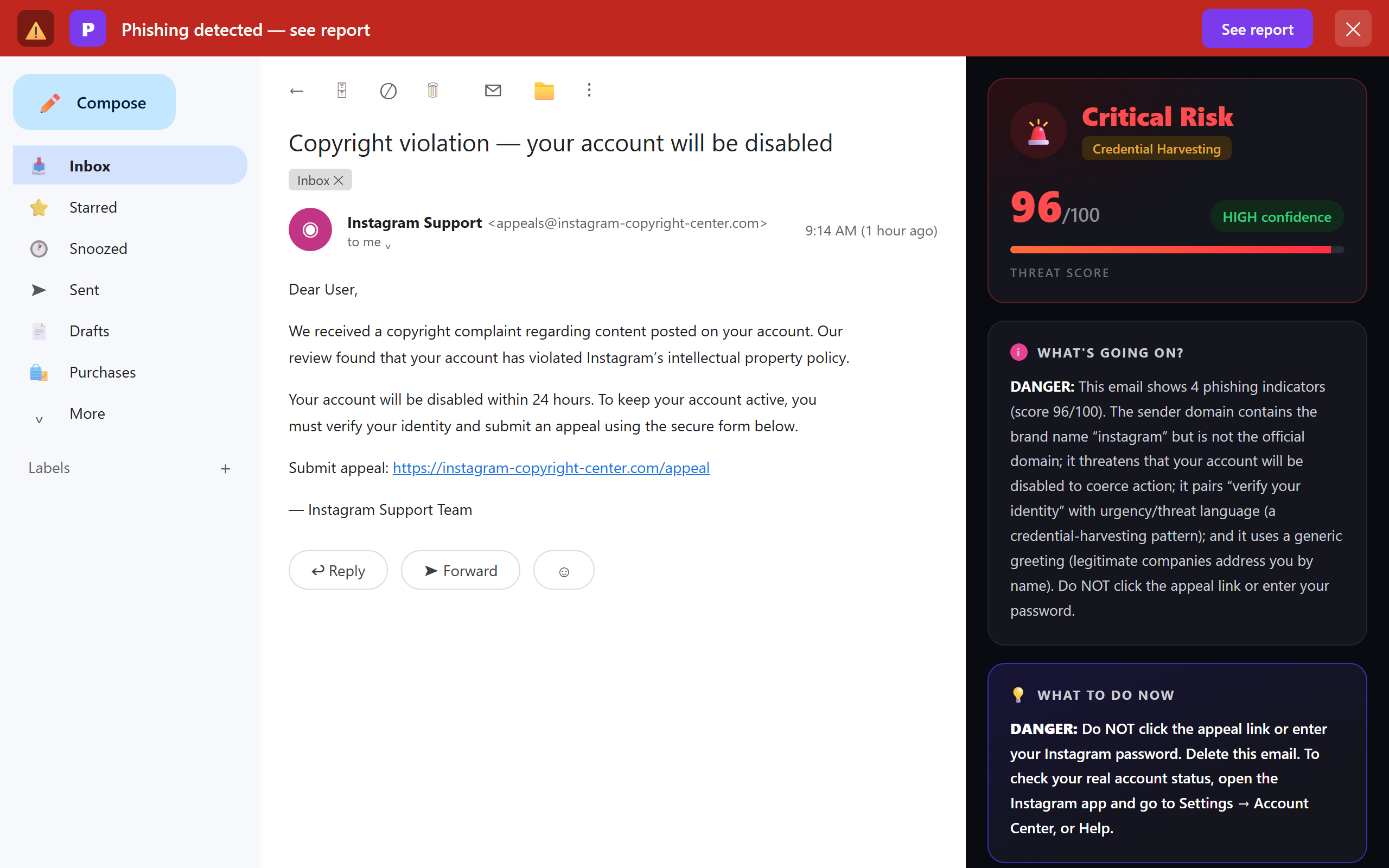
What a real Instagram email looks like
- It comes from a Meta domain. Instagram’s notification and security emails come from addresses ending in mail.instagram.com, and Meta also uses facebookmail.com across its family of apps. A sender like instagram-copyright-center.com or meta-appeals.net merely contains the words — it isn’t Meta.
- Anything important is mirrored inside the app. A real copyright strike or account restriction shows up when you open Instagram, and if your account is actually disabled you’ll see it — and the appeal path — the moment you try to log in. Instagram doesn’t run enforcement exclusively through your email inbox.
- It doesn’t ask for your password or 2FA code through a link. A real notice may point you to the app to log in normally — but the fake’s whole purpose is the login form at the end of its link.
- You can verify it from inside the app. This is the feature most people don’t know exists: Instagram keeps a list of the security emails it has actually sent you. In Settings, search for “Emails from Instagram.” It shows the security-related emails Instagram sent in the last 14 days. If the message in your inbox isn’t in that list, Instagram didn’t send it.
6 tells of the fake
1. The sender domain isn’t Meta’s
Tap or click the sender name to reveal the full address, and read the registered domain — the part just before the last dot-something.
<appeals@instagram-copyright-center.com>
instagram-copyright-center.com contains “instagram,” but the registered domain is not instagram.com — it’s a domain someone bought last month. The same trick powers the sibling Facebook “account will be disabled” scam; read domains from the right and it falls apart.
2. A deadline measured in hours
“Within 24 hours” is pressure engineering, not policy. Real copyright enforcement gives you an in-app notice and an appeal path that doesn’t evaporate overnight. The countdown exists to make you act before you think — the same clock runs through every scam in this family.
3. An “appeal form” that starts with your password
Follow the fake link and you land on a convincing “appeal” or “verification” page whose first step is logging in — on a domain that isn’t instagram.com. Some versions then ask for the code from your authenticator app or the SMS code “to confirm your identity.” That’s the scammer logging into your real account in real time and relaying the two-factor prompt to you. No legitimate appeal starts by asking for your password on a third-party site.
4. “Dear User”
Instagram knows your username and name — its real emails use them. A generic greeting on an “account enforcement” email means it was blasted to a list.
5. It arrived as a DM, not an email
A large share of these “copyright violation” warnings land as direct messages from accounts posing as “Instagram Support,” “Meta Copyright Team” or “Community Guidelines,” sometimes with a blue-tick-style avatar and a countdown. Instagram does not adjudicate copyright through DMs from ordinary accounts. If a message like this is in your DMs, don’t tap the link — report and block the account, then check your real status in the app.
6. The link doesn’t go to instagram.com
Long-press (mobile) or hover (desktop) the button before tapping. Real Instagram links live on instagram.com. A “secure appeal portal” on ig-appeal.help, a Google Form, a Linktree, or a shortened link is not an official appeal — it’s the harvesting page.
The 30-second Instagram email check
- Is the sender on mail.instagram.com or facebookmail.com — not a lookalike?
- Does Settings → “Emails from Instagram” list this message?
- When I open the app directly, does anything about it appear?
- Is it racing me with a 24-hour deadline?
- Does the “appeal” want my password on a non-instagram.com page?
The one place to check — and the real appeal path
If you’re worried the warning might be real, don’t use the email. Go straight to the app:
- Open Instagram and look. A genuine copyright strike or account restriction shows up in the app. If your account really were being disabled, you’d meet an in-app screen — with a “Request a review” option — the moment you tried to log in.
- Check “Emails from Instagram.” In Settings, search for that phrase. It lists the security emails Instagram actually sent you in the last 14 days. Not there? Instagram didn’t send it. (Meta moves menus around; searching Settings finds it faster than clicking through.)
- Use the real Help Center. Any genuine appeal happens inside the app or through the official Help Center at help.instagram.com — never through a form emailed to you that opens by asking for your password.
Because these scams increasingly arrive as DMs and SMS as well as email, the habit that protects you isn’t spotting one particular message — it’s refusing to act on any account warning until you’ve confirmed it inside the app you actually own.
What to do with the fake
- Don’t click the appeal link. If you want certainty first, run the “Emails from Instagram” check above.
- Report it: use “Report phishing” in Gmail or Outlook. You can also forward phishing emails that impersonate Meta to phish@fb.com. If it came as a DM, report and block the account inside Instagram.
- Delete it.
- Warn anyone who helps run the account. If a teammate or social manager shares access, one person’s login is enough to lose the account — make sure they know this scam is circulating.
What if you already entered your password?
Move fast — account takeovers of this kind happen within hours:
- Change your Instagram password now, from the app or instagram.com typed by hand — never from the email.
- Turn on two-factor authentication if it wasn’t on. If you gave away a 2FA code too, assume the attacker is in: open Settings → Accounts Center → Password and security → Where you’re logged in and end every session you don’t recognise.
- Locked out? Use Instagram’s login-help and hacked-account recovery flow (“Get help logging in” on the login screen, or instagram.com/hacked).
- Change the password anywhere you reused it — and review any apps connected to your Instagram or Facebook login.
Our what-to-do-after-you-entered-your-password guide walks the full recovery checklist calmly, and the warning signs of a phishing email will sharpen your eye for the next attempt. If you want to see an email’s technical trail — where it really came from, whether it passed authentication — paste its headers into our free email header analyzer.
Frequently asked questions
Is the Instagram copyright / account-disabled email real or fake?
Almost always fake. Instagram does enforce copyright and can disable accounts, but real enforcement also appears inside the app — when you open it, or when you try to log in. Real emails come from mail.instagram.com (and other Meta domains such as facebookmail.com). A message demanding you “appeal” within 24 hours through an outside link, then asking for your password, is the scam.
What email address does a real Instagram email come from?
Instagram’s security and notification emails come from addresses ending in mail.instagram.com, and Meta also uses facebookmail.com across its apps. A sender like instagram-copyright-center.com merely contains the word “instagram” — read the address from the right and the registered domain gives it away.
How can I check if my Instagram account is really being disabled?
Open the app directly — not any link in the email. A real action shows up in the app, often as a screen the moment you log in with a “Request a review” option. You can also check Settings → “Emails from Instagram”: if the message isn’t in that list, Instagram didn’t send it.
I entered my password on the fake appeal form. What now?
Change your Instagram password immediately, enable two-factor authentication, and end unrecognised sessions under Accounts Center → Password and security → Where you’re logged in. Locked out? Use “Get help logging in” or instagram.com/hacked. Then change that password anywhere else you used it.
What about the copyright warning that arrived as a DM?
Same scam, different delivery. Instagram doesn’t run copyright enforcement through DMs from ordinary accounts. Don’t tap the link — report and block the account, and check your real status inside the app.
Keep reading
- Is that Facebook "account will be disabled" email real? — The same Meta-family play against your Facebook login and pages.
- How to tell if an email is phishing — The warning signs behind every scam in this family.
- I gave my password to a phishing site — Entered your login on a fake page? Damage control, step by step.
Not sure about an email? Let Phixo check it
Phixo is a browser extension that reads the email open in your Gmail or Outlook and checks it against several of the signals above — sender and domain reputation, lookalike brand domains, link mismatches, and email authentication (SPF, DKIM, DMARC) — plus an AI read of the language, and flags anything suspicious in seconds. It catches the email version of these scams; a warning that reaches you as an in-app Instagram DM or an SMS is outside what a browser extension can see. Free plan includes 10 scans a day, no credit card. A one-time Google or Microsoft sign-in keeps your scan count tied to your account.
Install Phixo free →Your email body is never stored. Analysis happens in real time and is discarded immediately.