Published 4 August 2026 · ~7 min read · By the Phixo team
Job scams have exploded alongside remote work, and they’re effective for a simple reason: they arrive when people want them to be real. A flexible, well-paid role landing unprompted in your inbox is easy to rationalise — maybe a recruiter found your CV, maybe you got lucky. Scammers count on that hope to switch off the scrutiny you’d apply to a “your account is locked” email.
But the fake job offer follows a script as predictable as any phishing message. Strip away the friendly tone and it’s always heading toward one of two payouts: your money (through a fake check or an equipment “fee”) or your identity (through the personal and banking details you hand over during “onboarding”). Recognise the pattern once and you’ll spot every variant.
The quick answer
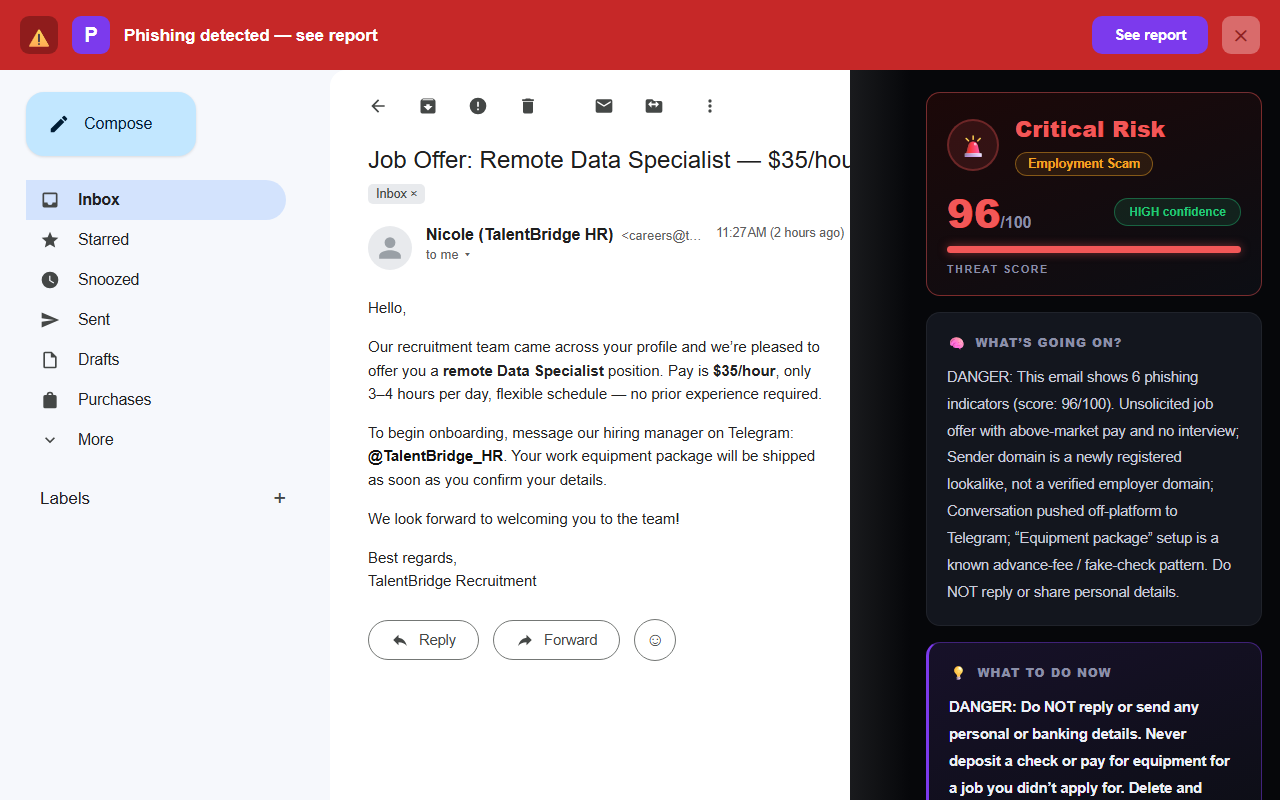
Treat a job offer as a scam if you never applied, the pay is high for little work, there’s no real interview, and it pushes you to WhatsApp or Telegram to continue. Real employers hire from a company email domain, interview you properly, and never ask you to pay for equipment, deposit a check and wire part of it back, or hand over bank details before you’ve signed anything. Verify by checking the sender’s domain against the company’s real website, and by finding the role on the company’s own careers page yourself.
How the fake job offer actually works
The email is the opener. Once you reply or message the “hiring manager,” the scam moves toward one of these ends:
- The fake-check / equipment scam. You’re “hired,” then sent a check to deposit and told to buy a laptop, software or gift cards from a specific vendor with part of it. The check is counterfeit; days later your bank claws the money back, but the money you spent is gone — and you’re liable.
- The data-harvest scam. “Onboarding” asks for your Social Security or national ID number, a photo of your driver’s licence, and your bank details for “direct deposit” — enough to open accounts or file fraud in your name.
- The advance-fee scam. A “background check fee,” “training kit,” or “equipment deposit” you must pay up front and get reimbursed later. The reimbursement never comes.
- The money-mule trap. The “job” is receiving payments and forwarding them on — which is laundering someone else’s stolen money, and can leave you facing the consequences.
The golden rule: in a real job, money flows to you and only to you. The instant an “employer” needs you to pay for something, buy something specific, or move money on their behalf, the offer is a scam — no matter how professional the email looked.
6 tells of a fake job offer email
1. You never applied
An offer — not even an interview invite, an offer — for a role you never sought is the first red flag. Legitimate hiring doesn’t skip the part where you apply.
2. The pay is high and the work is vague
“$35/hour, 3–4 hours a day, no experience required” for a role no one could describe. Scammers dangle the reward and stay fuzzy on the work, because there is no work.
3. The sender domain doesn’t match the company
Click the sender name and read the part after the @. A real recruiter at a company writes from that company’s domain.
<careers@talentbridge-hiring.info> or <recruiter.talent093@gmail.com>
A free Gmail address, or a lookalike domain registered last week, doing the hiring for a “company” is the tell. Check the domain against the firm’s real website.
4. It moves you to WhatsApp or Telegram
“Message our hiring manager on Telegram to continue.” This is the single most reliable sign. Those apps have no employer verification, leave no email trail, and let the scammer vanish. Real hiring happens over company email and scheduled interviews.
5. There’s no real interview
A quick text chat, or a “screening” that’s really just onboarding forms, stands in for a proper conversation. No serious employer offers a job without talking to you meaningfully first.
6. Money or personal details come up early
Bank details for “payroll,” a fee for “equipment,” a check to deposit — anything financial before you’ve signed a real contract is the scam arriving. Stop there.
The 30-second job-offer check
- Did I actually apply for this role?
- Does the sender’s domain match the company’s real website?
- Is it pushing me to WhatsApp or Telegram?
- Is the pay high for barely any described work?
- Has anyone asked me to pay, deposit a check, or share bank details?
The safe way to check an offer
Take the email out of the loop and verify at the source:
- Don’t reply, and don’t message the chat handle it gives you.
- Open a new tab and go to the company’s official website yourself — type the name into a search engine, don’t use any link in the email. Check the careers page for the actual role.
- If you want to confirm, contact the company through the phone or email on their real site and ask whether the offer and the recruiter are genuine.
- Search the company or role name plus the word “scam” — these campaigns are often already reported by others.
Impersonation is common. Scammers borrow the names of real, reputable companies and copy real job titles to look legitimate. A recognisable company name proves nothing on its own — the email domain and the hiring process are what tell you the truth.
Why this scam slips past careful people
Most phishing plays on fear — a locked account, a failed payment, a package on hold. The job scam is unusual because it plays on hope, which lowers your guard in a different way: you want it to be real, so you look for reasons to believe rather than reasons to doubt. That’s the same emotional lever behind other “good news” scams, and the antidote is identical to the one in our guide to spotting a phishing email — verify at the source instead of trusting the message. And like the fake invoice email, the fake job offer is aimed squarely at freelancers and job-seekers, who see real recruiter mail often enough that one more doesn’t stand out.
What if you already engaged?
How far it went determines what to do — work down this list:
- If you only replied or chatted: stop responding and block the sender. No harm done beyond confirming your address is live.
- If you shared personal details (ID number, driver’s licence, date of birth): watch for identity theft, consider a credit freeze with the credit bureaus, and report it — in the US at reportfraud.ftc.gov and, for identity theft, identitytheft.gov.
- If you shared bank details or deposited a check: call your bank immediately, explain what happened, and don’t spend any of the “deposited” money — it will be reversed. Ask them to watch the account.
- If you sent money or gift cards: report to your bank or the gift-card company at once (speed matters most), and file at reportfraud.ftc.gov.
- If you entered a password anywhere during “onboarding,” change it and follow our post-click recovery checklist.
Frequently asked questions
How can I tell if a job offer email is a scam?
Look for the pattern: an unexpected offer for a job you never applied to, high pay for little work, no real interview, and a push to WhatsApp or Telegram. Real employers hire from a company domain, interview you, and never ask you to pay for equipment or deposit a check and send part back. Check the sender’s domain against the company’s real site.
Why do scammers move to WhatsApp or Telegram?
Those apps have no employer verification, no email trail, and let them delete messages and disappear — and they get you away from your inbox’s spam filters. Genuine recruiting happens over company email and scheduled interviews.
The company is real — is the offer real too?
Not necessarily. Scammers impersonate real companies and copy real job titles to borrow credibility. Verify on the company’s official careers page and contact them through their real site — never through the email or chat you were handed.
A job asked me to deposit a check and buy equipment — scam?
Yes, that’s the fake-check scam. The check bounces after you’ve spent real money on “equipment,” and you’re left liable. No legitimate employer sends money before day one or makes you buy your own equipment through them.
Keep reading
- How to spot a fake invoice email — The other scam aimed straight at freelancers and small businesses.
- The 8 warning signs of a phishing email — The checks that expose almost every fake.
- What to do if you clicked a phishing link — Shared details or a password? Recovery, step by step.
- The best anti-phishing browser extensions — The tools that catch emails like this one, compared side by side.
Not sure about an email? Let Phixo check it
Phixo is a browser extension that checks the email open in your Gmail or Outlook against several of the signals above — sender and domain reputation, link mismatches, lookalike domains, and email authentication (SPF, DKIM, DMARC) — plus an AI read of the language that flags patterns like unsolicited offers and off-platform chat pushes. Free plan includes 10 scans a day, no credit card. A one-time Google or Microsoft sign-in keeps your scan count tied to your account.
Install Phixo free →Your email body is never stored. Analysis happens in real time and is discarded immediately.