Published 6 August 2026 · ~7 min read · By the Phixo team
Travel is the perfect cover for a scam. You’ve paid real money, a trip is coming up, and the fear of arriving to find no room is sharp and immediate. So when an email or message arrives claiming your Booking.com reservation can’t be confirmed because your card “failed verification,” the pressure works — especially with a countdown attached.
This scam has a nastier twist than most. In the ordinary version, it’s a lookalike email from a spoofed domain. But in a version that’s been widely reported, scammers first break into a hotel’s Booking.com account and message guests through the platform’s genuine chat and email — so the message carries your real name, real hotel, real dates, and arrives looking entirely official. The details are stolen; the request is still the trap. Here’s how to tell.
The quick answer
Booking.com does not ask you to “re-verify” your card through an emailed link on a deadline, and it does not threaten to cancel a confirmed reservation unless you type your card details right now. Card management lives inside your account and the app. Treat any “verify your card or lose your booking” message as phishing — even one that quotes real trip details. The safe check: ignore the link, open the official Booking.com app (or type booking.com yourself), and look at your trip there. If the app shows it confirmed with no action needed, the message was the fake.
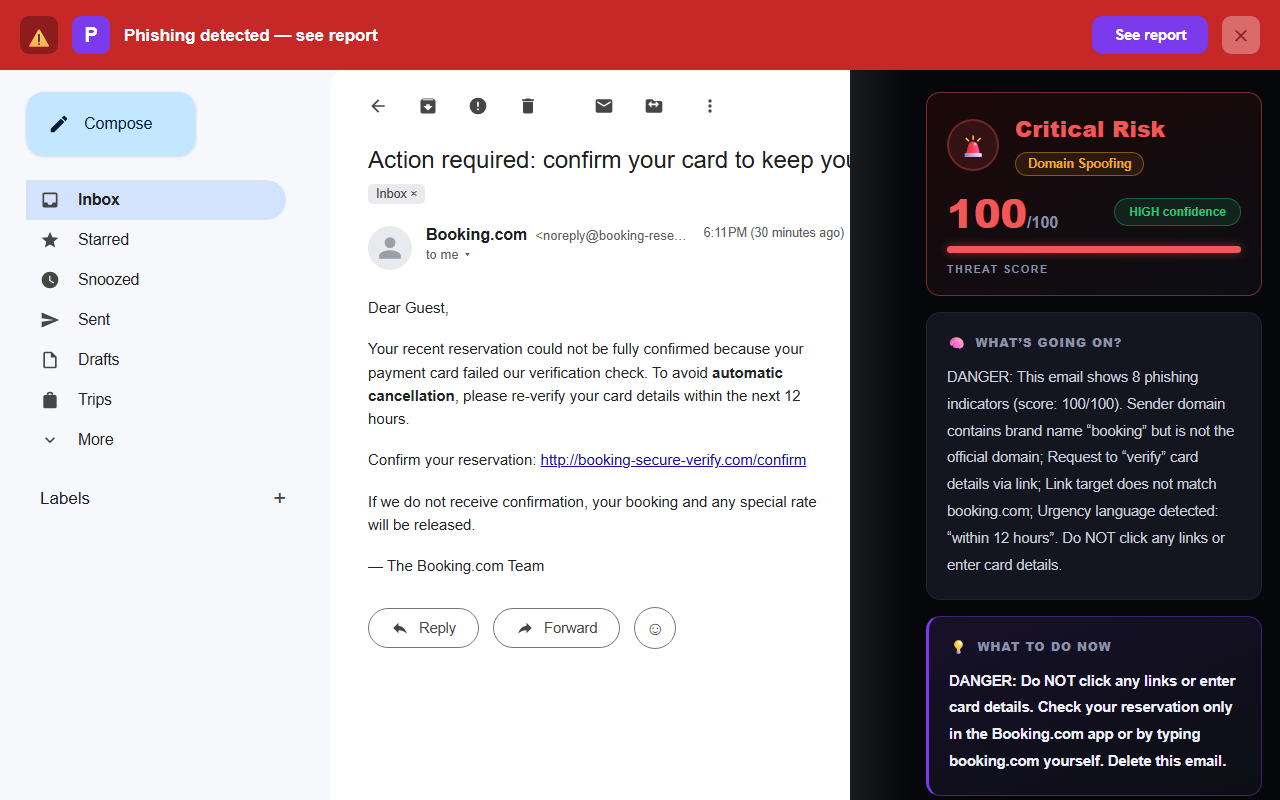
How the fake booking email actually works
The goal is always your card details, reached one of two ways:
- The spoofed-email version. A message from a lookalike domain (booking-secure-verify.com, booking-reservation-verify.com) with Booking.com’s branding, a “confirm your reservation” button, and a deadline. The button leads to a convincing fake payment page that captures your full card number, expiry and security code.
- The hacked-hotel version. Scammers phish a hotel’s own Booking.com login, then use that access to message the hotel’s upcoming guests through the platform’s real chat or email. Because it’s genuinely from the platform and quotes your real booking, it clears the mental checks people rely on — but it still funnels you to an off-platform page to “secure” the reservation with your card.
Why the second version is so effective: every “is this real?” instinct you have — correct hotel, correct dates, arrived through the app I trust — says yes. The one thing that stays constant is the ask: enter your card on a linked page to avoid cancellation. That request is never legitimate, no matter how real the wrapper looks.
6 tells the booking message is fake
1. It asks you to “verify” or re-enter your card
This is the core of it. A confirmed booking doesn’t need your card “re-verified” by clicking a link. Any request to confirm card details to keep a reservation is the scam itself.
2. A cancellation deadline
“Within 12 hours or your booking is released.” The countdown exists to make you act before you check. Real reservations don’t evaporate because you didn’t click an email fast enough.
3. The sender or link isn’t booking.com
Click the sender name and hover the button to read the true destination. Booking.com’s email and links live on booking.com.
<noreply@booking-reservation-verify.com>
Button → http://booking-secure-verify.com/confirm
A domain that merely contains the word “booking” is not booking.com. (In the hacked-hotel version the sender may genuinely be the platform — there, tells 1, 2 and the off-site payment link do the work instead.)
4. Payment is pushed off the platform
Booking.com handles payment within its own system. A message steering you to an external site or a bank transfer to “hold” the room is going somewhere Booking.com doesn’t operate — and can’t protect you.
5. A generic greeting
“Dear Guest” in the spoofed-email version. (The hacked-hotel version may use your real name, so treat this as a supporting tell, not a decider.)
6. Pressure plus a payment page
Urgency and a form asking for card details in the same message is the fingerprint of almost every payment-phishing scam — the same structure as the fake Netflix “payment failed” email, just wearing a travel theme.
The 30-second booking-message check
- Is it asking me to “verify” or re-enter my card via a link?
- Is there a cancellation countdown pushing me to act now?
- Does the sender / button really point to booking.com?
- Is payment being pushed off the platform?
- Does the trip look fine in the official Booking.com app?
The single safest way to check
Take the message out of the equation and go to the source:
- Don’t click the link or open any payment page from the message.
- Open the official Booking.com app, or type booking.com into your browser yourself and sign in.
- Find your reservation in your account and read its real status there.
- If you want to confirm, contact the property or Booking.com support through the app — not through the number, link or reply address in the suspicious message.
If the app shows your booking confirmed and asks for nothing, the message was the fake. Report it to Booking.com through the official app or site so they can act on the hotel account if it’s been compromised, and delete the message.
Why this scam works so well
The fake booking message stacks two pressures most scams only get one of: a real financial stake (you’ve already paid) and a hard time limit (your trip is soon). Add a version that arrives through the genuine platform with your real details, and even a careful traveller’s instincts get turned into a liability — everything looks right. That’s exactly why appearance is the wrong thing to judge on, here and everywhere. As with the broader signs of a phishing email, the reliable move isn’t deciding whether the message looks real — it’s refusing to act inside the message at all, and checking your booking where Booking.com actually keeps it. For the technical trail of a spoofed one, our free email header analyzer shows where a message really came from.
What if you already entered your card?
Move quickly — the sooner you act, the less the details are worth:
- Call your bank or card issuer now and have the card blocked and reissued. Watch the statement for small “test” charges that precede larger ones.
- If you entered your Booking.com password, change it at booking.com (typed by hand), and anywhere you reused it, then turn on two-factor authentication.
- Report it to Booking.com through the official app or website, so they can investigate a possibly hacked hotel account.
- Report the fraud to your national service — in the US at reportfraud.ftc.gov, in the UK to Action Fraud.
- If you only clicked and entered nothing, close the page and you’re likely fine — a malware scan doesn’t hurt.
For the complete cleanup, step by step, see what to do if you clicked a phishing link.
Frequently asked questions
Does Booking.com ask you to verify your card or lose your reservation?
No. It doesn’t ask you to re-verify your card through an emailed link on a countdown, and it never threatens to cancel a confirmed booking unless you enter card details immediately. Card management happens in your account or the app. That pressure is the scam.
Why does the message know my real hotel and dates?
In one common version, scammers compromise a hotel’s Booking.com account and message guests through the platform’s genuine chat — so it carries real reservation details. The stolen details make it convincing, but the “verify your card” request is still fake. Check your booking only in the official app.
How do I check if my reservation is really at risk?
Don’t click the message’s link. Open the official Booking.com app or type booking.com yourself, sign in, and read your trip’s real status. If it’s confirmed and needs nothing, the message was the fake.
I entered my card on a fake page — what now?
Contact your bank immediately to block and reissue the card, change your Booking.com password (and anywhere you reused it), turn on two-factor authentication, and report the message to Booking.com and your national fraud service.
Keep reading
- Is that USPS “package could not be delivered” email real? — The same tiny-fee, urgent-link card-harvest, delivery edition.
- Is that Netflix “payment failed” email real? — The purest form of the payment-page phishing scam.
- What to do if you clicked a phishing link — Entered your card? Act fast — here’s how.
- The best anti-phishing browser extensions — The tools that catch emails like this one, compared side by side.
Not sure about an email? Let Phixo check it
Phixo is a browser extension that checks the email open in your Gmail or Outlook against several of the signals above — sender and domain reputation, link mismatches, lookalike domains, and email authentication (SPF, DKIM, DMARC) — plus an AI read of the language, and flags anything suspicious in seconds. Free plan includes 10 scans a day, no credit card. A one-time Google or Microsoft sign-in keeps your scan count tied to your account.
Install Phixo free →Your email body is never stored. Analysis happens in real time and is discarded immediately.