Published 13 July 2026 · ~7 min read · By the Phixo team
You already know not to click a dodgy link. You check the sender, you hover over the URL, you look for the tell-tale signs. Attackers know you do this too — so they came up with a way to skip all of it. Instead of a clickable link, they send you a QR code. You scan it with your phone, a website opens, and you’re on a fake login page before a single one of your usual checks has run.
This is quishing — a blend of “QR” and “phishing.” It has become one of the more common ways phishing gets past both people and filters, and security teams have reported a sharp rise in it over the last couple of years. This guide explains what it is, why it works so well, and exactly how to protect yourself.
What is quishing?
Quishing is phishing where the malicious link is encoded inside a QR code rather than shown as ordinary text or a button. A QR code is just a machine-readable way of storing data — usually a web address. When your phone camera reads it, it offers to open that address. If the address points to an attacker’s fake site, you’ve been quished.
Because the destination is buried inside a grid of black-and-white squares, you can’t read it with your eyes. The QR code could point to your bank or to a credential-harvesting page in another country and it would look exactly the same. That opacity is the entire point.
Where quishing shows up
Quishing appears both in your inbox and out in the physical world. In email, the most common set-ups play on things you’re conditioned to act on quickly:
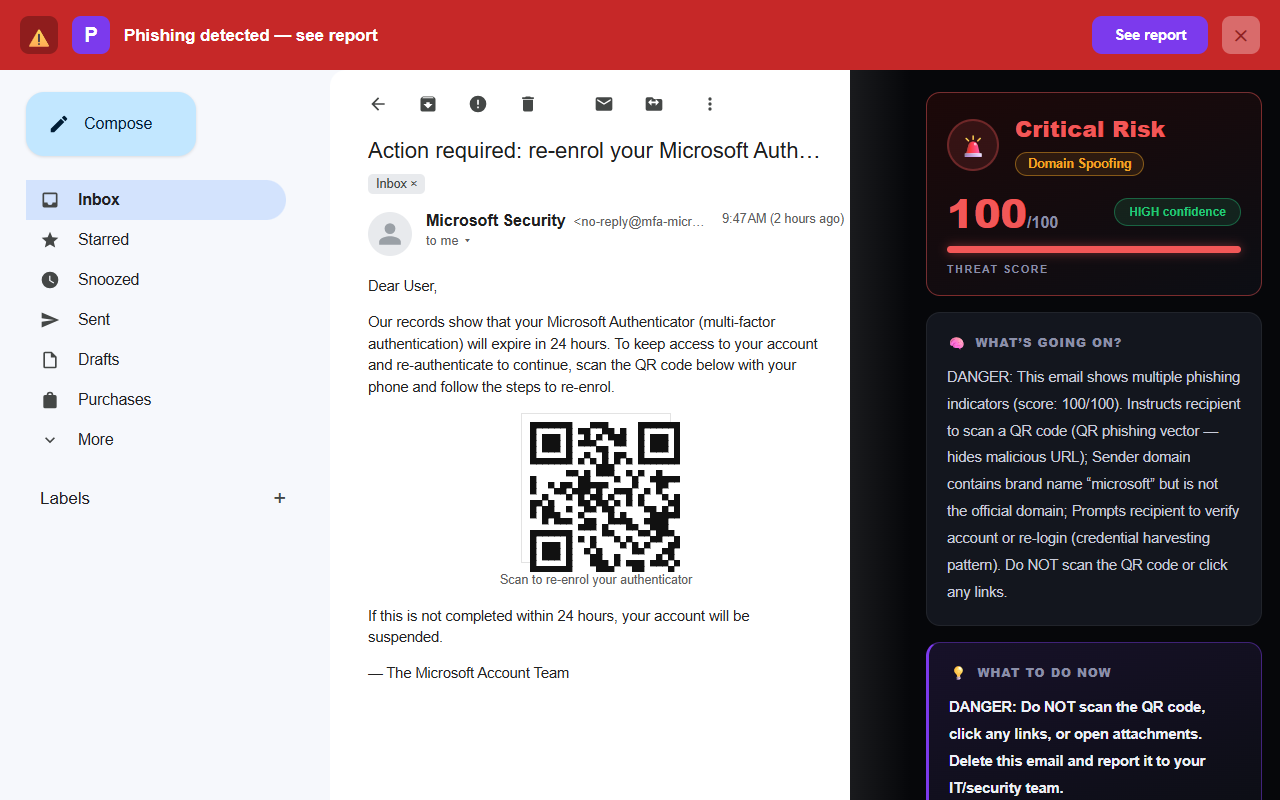
- “Your MFA/2FA is expiring—re-enrol now.” A message that looks like it’s from Microsoft or your IT team, with a QR code to “reset your authenticator.” Scanning it leads to a fake Microsoft login.
- Fake HR, payroll, or benefits documents. “Scan to review your updated salary letter” or “confirm your direct-deposit details.”
- “Scan to view your invoice / voicemail / shared document.” The QR stands in for the usual malicious link, often inside a PDF attachment so it slips past text-based filters.
In the physical world, attackers exploit the fact that you can’t tell a genuine code from a fake one:
- Parking meters and pay-to-park signs with a sticker placed over the real code, routing your payment — and card details — to a scammer.
- Restaurant menus, posters, and flyers where a printed sticker overlays the legitimate QR code.
- Fake “fine” or “delivery” notices stuck to your car or door, telling you to scan and pay.
The common thread: a QR code moves the risky moment off your computer and onto your phone — a device that’s smaller, more trusted, and far less protected.
Why quishing works so well
Quishing isn’t clever code. It’s clever psychology and a gap in how we’re protected. Three things stack up in the attacker’s favour.
It bypasses your link inspection
Everything we teach people about spotting bad links — hover to preview the URL, read the domain, watch for lookalike addresses — assumes there’s a link you can inspect. A QR code has no visible destination to hover over or read. The check simply can’t happen until after you’ve scanned.
It moves you onto your phone
You almost always scan a QR code with a phone, not the computer where the email arrived. That matters. Phones are often outside the protections that guard a work laptop or desktop. The screen is small, the address bar is short and easily truncated, and you’re frequently on the move and distracted when you scan. A lookalike domain that you’d catch on a big screen slips right past on a phone.
The URL stays hidden until it’s (almost) too late
With a normal phishing email, the malicious URL is at least present in the message, where a filter or a careful reader might catch it. A QR code hides the URL inside an image. Many email security filters historically scanned text and links but not the contents of an embedded QR image, which is part of why attackers moved to it. The address only surfaces at the moment you scan — by which point you’re one tap from the fake site.
How to protect yourself from quishing
The good news: the defences are simple, and they’re mostly habits you already have. You just need to extend them to QR codes.
Treat an unexpected QR code exactly like a suspicious link
If you wouldn’t click a link in a given email, don’t scan a QR code in it either. A code inside an email you didn’t expect — especially one pressuring you to act quickly about your account, your pay, or a payment — deserves the same suspicion. The QR format doesn’t make the sender any more trustworthy.
Preview the decoded URL before you open it
Most modern phone cameras show the web address a QR code contains before opening it — usually as a banner or preview you have to tap to proceed. Stop and read it. Check the domain (the part right before the first single slash) character by character. If it isn’t the exact official domain you expect — or it’s a shortened link that hides the real one — don’t open it.
Actually decoded: mfa-reset-portal.secure-login-verify.com
Never enter credentials on a page you reached via a QR code
This is the single most important rule. A QR code should never be the path by which you log in or hand over a password or payment details. If a scan lands you on a login screen, close it. Open the service the way you normally would — the official app, or by typing the address yourself — and sign in there.
For payments and parking, use the official app or a typed address
Don’t pay for parking, fines, or anything else by scanning a code on a sign or notice. Use the parking operator’s official app, or type their known web address into your browser. At restaurants, if a menu QR code asks you to log in or pay in a way that feels off, ask staff for the real link.
Your quishing quick-check
- Was I expecting a QR code from this sender?
- Is it pressuring me about my account, pay, or a payment?
- Does the previewed URL show the exact official domain?
- Am I about to enter a password or payment via a scan? (Don’t.)
- Has a sticker been placed over a code in the real world?
What to do if you already scanned one
If you scanned a code but didn’t enter anything, close the page and you’re most likely fine — simply loading a page rarely does harm on its own. If you did enter details, act quickly:
- Change the password you entered immediately, on the real website (not through any link from the email), and turn on two-factor authentication if it isn’t already.
- If you entered card or banking details, contact your bank to flag the card and watch for fraudulent charges.
- Check the account for unfamiliar logins, changed recovery details, or forwarding rules you didn’t set up.
The steps are the same as for any phishing link, so we’ve written them out in full: what to do if you clicked a phishing link.
How Phixo helps with quishing emails
Let’s be precise, because this matters. Phixo does not decode or scan the QR code itself — it doesn’t read what’s inside the image. What it does is analyse the email the code arrives in, and quishing emails almost always give themselves away in that surrounding context.
When you open an email in Gmail or Outlook, Phixo checks the things a QR code can’t hide: whether the sender’s domain and reputation hold up, whether the message passes SPF, DKIM, and DMARC authentication (spoofed senders often fail these), whether there’s pressure or urgency language typical of an attack, and whether any other links in the email point somewhere suspicious. It also flags the quishing pattern directly: if the email tells you to scan a QR code to verify or re-enrol, Phixo treats that instruction itself as a risk signal — without ever reading what the code contains. A fake “re-enrol your MFA” or “review your payslip” email usually trips several of those checks — even though the QR code itself was never opened. If you’d like the underlying detail, our free email header analyzer shows you those authentication results for any message.
The honest boundary: Phixo flags a risky quishing email by reading its context, not by inspecting the QR code. Your own habit — never logging in or paying via a scanned code — is still your best defence at the moment of the scan.
Frequently asked questions
What is quishing?
Quishing is QR code phishing — a phishing attack where the malicious link is hidden inside a QR code instead of a normal clickable link. Scanning the code with your phone opens a fake website built to steal your password, payment details, or personal information.
Is it safe to scan a QR code in an email?
Treat a QR code in an unexpected email exactly like a suspicious link — don’t scan it. If you do, most phone cameras show the decoded address before opening it, so check the domain carefully, and never enter a password or payment details on a page you reached through a QR code.
How is quishing different from normal phishing?
The goal is identical — steal your information — but the delivery differs. Normal phishing uses a link you can inspect; quishing hides the link in a QR code you can’t read by eye, and usually moves you onto your phone, where you’re less protected and more likely to miss a lookalike domain.
Keep reading
- The 8 warning signs of a phishing email — The checks that expose almost every fake, QR or not.
- Can you spot the phish? — Test your eye on 8 real-vs-fake emails — no sign-up, nothing recorded.
- What to do if you clicked a phishing link — Scanned the code and clicked? Damage control, step by step.
- The best anti-phishing browser extensions — The tools that catch emails like this one, compared side by side.
Let Phixo check the emails behind the codes
Phixo is a browser extension that checks each email you open in Gmail or Outlook for the signals a QR code can’t hide — sender and domain reputation, email authentication (SPF, DKIM, DMARC), pressure language, and suspicious links — then flags anything risky. It doesn’t decode QR codes; it catches the quishing email around them. Free plan includes 10 scans a day, no credit card. A one-time Google or Microsoft sign-in keeps your scan count tied to your account.
Install Phixo free →Your email body is never stored. Analysis happens in real time and is discarded immediately.