Published 18 August 2026 · ~8 min read · By the Phixo team
You’re expecting a package — or you order online often enough that you might be. A message arrives, by email or text: “Your FedEx package is on hold” or “We attempted delivery but couldn’t complete it.” There’s a tracking-style link, often a tiny “redelivery fee,” and a deadline before the parcel is “returned to sender.”
This is the fake FedEx delivery notice, and it works for one simple reason: at any given moment, millions of people genuinely are waiting for a package. The scammer doesn’t need to know you’re one of them — they blast the same message to everyone and let probability do the rest. FedEx is one of the most-impersonated shipping brands in the world; the USPS, DHL and UPS versions are identical in structure. Here’s how to recognise it in seconds.
The quick answer
An unsolicited “FedEx package on hold” message with a link is almost certainly a scam. FedEx only sends delivery updates you asked for — through FedEx Delivery Manager, or tracking you requested on a specific shipment — and it does not email you a card form to pay a redelivery fee. The safe check takes one minute: don’t touch the message’s link, find the tracking number from your original order confirmation, and enter it yourself at fedex.com. If there’s a real problem with a real package, it will show there.
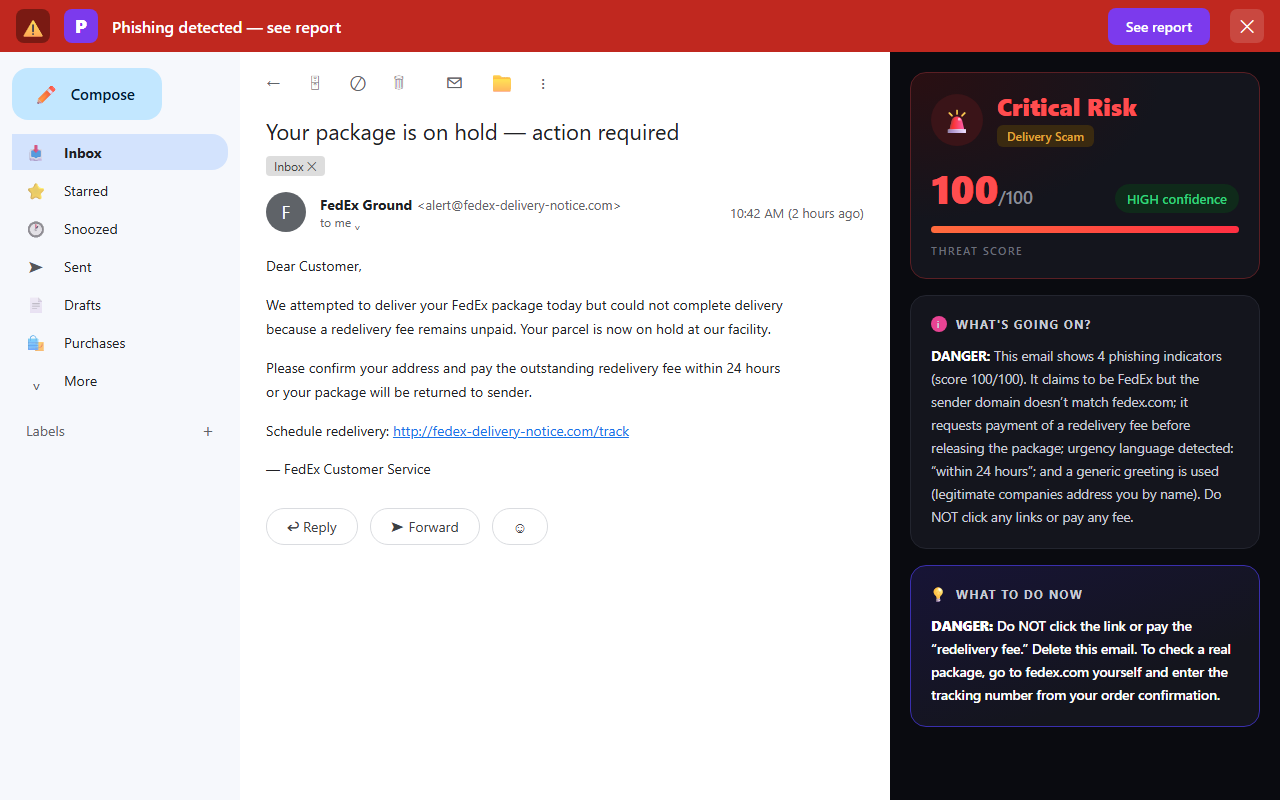
What the fake FedEx email actually says
Almost every version reuses the same handful of lines. If you’ve landed here after pasting one into a search box, you’ll probably recognise the wording:
Dear Customer,
We attempted to deliver your FedEx package today but could not complete delivery because a redelivery fee remains unpaid. Your parcel is now on hold at our facility.
Please confirm your address and pay the outstanding fee within 24 hours or your package will be returned to sender.
Schedule redelivery: http://fedex-delivery-notice.com/track
Other common subject lines: “FedEx: delivery attempt failed,” “Your shipment is waiting — confirm address,” “Unpaid customs fee on your parcel,” and “Package #FDX… could not be delivered.” The details change; the shape never does.
How the fake FedEx delivery notice works
The link routes you to a convincing FedEx-branded page that asks you to “confirm your address” — and then, almost always, to pay a small redelivery or customs fee: 30 cents, a dollar, $2.99. That number is chosen carefully. It’s small enough that paying feels easier than thinking.
The fee is not the point. The scammer isn’t trying to collect $1 from you — the payment form exists to capture your full card number, expiry and security code. Test charges follow within days, then larger ones. Some variants skip the fee and harvest your address, phone and login details instead, or push a fake “FedEx tracking app” that carries malware.
5 signs the FedEx notice is fake
1. You didn’t ask for it
This is the strongest tell, and it’s about how FedEx actually behaves: FedEx doesn’t send unsolicited emails or texts about held packages. Delivery updates arrive only if you signed up for FedEx Delivery Manager or requested tracking on a specific shipment. If a physical delivery genuinely fails, the courier leaves a paper door tag — they don’t need to email you a form. An out-of-the-blue delivery problem in your inbox is a scam until proven otherwise.
2. The sender domain isn’t fedex.com
Tap or click the sender name to reveal the full address and read the part after the @.
<alert@fedex-delivery-notice.com>
Real FedEx email comes from fedex.com (tracking updates arrive from addresses like TrackingUpdates@fedex.com — the registered domain is still fedex.com). A domain such as fedex-delivery-notice.com, fedex-support.net or fedexparcel-track.com merely contains the letters “fedex.” The brand name in front of a hyphen means nothing; only the registered domain — the bit immediately before .com — tells you who really sent it. The USPS, DHL and UPS versions work identically: check against usps.com, dhl.com and ups.com.
3. It asks for money to release a package
FedEx redelivery of an attempted domestic parcel is free. Genuine customs or duty charges on international shipments do exist, but they’re handled through official channels and an itemised notice — not a $1 card form on a link from a text. Any small fee to “release,” “redeliver” or “verify” a package is the trap itself.
4. There’s no real tracking number
Genuine delivery notices reference a specific tracking number you can verify independently. Fakes usually have none, an obviously malformed one, or one that only “works” on the scammer’s own site. If you can’t take the number from the message and look it up yourself at fedex.com, the message has told you what it is.
5. Pressure and a deadline
“Within 24 hours or your package will be returned to sender.” Real carriers hold packages for days and leave physical notices. A countdown exists for one reason: to make you click before you think. The urgency is the red flag — the same pressure pattern we break down in the 8 warning signs of a phishing email.
Email or text? The scam comes both ways
The FedEx delivery scam lands in your inbox and in your text messages in roughly equal measure — the SMS version is often called “smishing.” The wording is nearly identical: a missed delivery, a lookalike link, a fee, a deadline. The safe response is the same for both. Don’t tap the link in a text any more than you’d click one in an email. Take the tracking number and check it yourself at fedex.com.
One honest limit worth knowing: a browser tool like Phixo reads the email in your Gmail or Outlook — it can’t see the texts on your phone. For SMS, the check is manual: never tap the link, and verify the tracking number at fedex.com directly. The tells above work on both.
The single safest way to check
Take the message out of the equation entirely:
- Don’t click any link in the email or text, and don’t call any number it gives you.
- Find the tracking number from your original order confirmation — the email from the shop you actually bought from.
- Open a new tab, type fedex.com (or usps.com / dhl.com / ups.com — whichever carrier the shop used) and enter the number there.
- If a delivery genuinely failed, the official tracking page will say so — and any redelivery can be arranged right there.
If the official tracking shows no problem — or you’re not expecting anything at all — the message is the fake. You can report FedEx impersonation by forwarding the email to abuse@fedex.com, then delete it.
The 30-second delivery notice check
- Am I actually expecting a package — and did I sign up for updates on it?
- Does the sender address end in fedex.com (the bit right before .com)?
- Is it asking for a fee or card details to release the package?
- Is there a tracking number I can verify on fedex.com myself?
- Is it racing me against a 24-hour deadline?
Why this scam works so well
The fake delivery notice needs no research about its victims. Online shopping is constant, so a “missed delivery” lands as plausible for a huge share of everyone it reaches — and unlike a bank alert, it feels routine rather than alarming, so your guard stays down. The tiny fee completes the trick: it reframes the interaction from “give a stranger your card” to “pay a normal small charge,” which is exactly how a fake Amazon “account on hold” email reframes credential theft as routine account maintenance.
Appearance won’t save you here — the fake pages copy FedEx branding pixel-perfectly. The reliable tells are behavioural: whether you asked for the message, the sender’s registered domain, whether money is requested, and whether the tracking number survives an independent check on fedex.com.
What if you already clicked or paid?
Move fast — the earlier you act, the less the card details are worth:
- If you entered card details: call your bank or card issuer now and have the card blocked and reissued. Watch the statement for small “test” charges.
- If you entered a password: change it immediately on the real site, and anywhere you reused it.
- If you only clicked and entered nothing, you’re probably fine — close the page and run a malware scan to be safe.
- Report it: forward the email to abuse@fedex.com and report phishing in your mail client.
For the complete cleanup, step by step, see what to do if you clicked a phishing link.
Frequently asked questions
Does FedEx send emails or texts about a package on hold?
Only if you asked for them — updates through FedEx Delivery Manager, or tracking you requested on a specific shipment. FedEx doesn’t send unsolicited messages about held packages, incomplete addresses or unpaid fees. When a real delivery fails, you get a paper door tag.
Does FedEx charge a redelivery fee by email?
No. FedEx doesn’t email you a link to pay a small redelivery fee with your card. Any message asking for one is a scam — the payment form exists to capture your card details, not to collect the dollar.
How do I check if I really have a FedEx package on hold?
Ignore the message’s link. Take the tracking number from your original order confirmation and enter it yourself at fedex.com. If there’s a genuine problem, the official tracking will show it.
I got a FedEx text about a package — is it real?
Treat it like a scam email. The delivery-notice scam arrives by text just as often as by email, and the tells are the same: you didn’t sign up for it, it links to a lookalike domain, it pressures you with a deadline, and it asks for a fee. Don’t tap the link — verify the tracking number at fedex.com.
Keep reading
- Is that USPS “package could not be delivered” email real? — The same scam in USPS colours, with the redelivery-fee trap broken down.
- The 8 warning signs of a phishing email — The checks that expose almost every fake.
- What to do if you clicked a phishing link — Paid the fake “redelivery fee”? Act fast — here’s how.
Not sure about an email? Let Phixo check it
Phixo is a browser extension that checks the email open in your Gmail or Outlook against several of the signals above — sender and domain reputation, link mismatches, lookalike domains, and email authentication (SPF, DKIM, DMARC) — plus an AI read of the language, and flags anything suspicious in seconds. Free plan includes 10 scans a day, no credit card. A one-time Google or Microsoft sign-in keeps your scan count tied to your account.
Install Phixo free →Your email body is never stored. Analysis happens in real time and is discarded immediately.